<?xml version="1.0" encoding="utf-8"?><feed xmlns="http://www.w3.org/2005/Atom" ><generator uri="https://jekyllrb.com/" version="3.10.0">Jekyll</generator><link href="https://pankajtw.github.io/feed.xml" rel="self" type="application/atom+xml" /><link href="https://pankajtw.github.io/" rel="alternate" type="text/html" /><updated>2026-02-12T14:15:25+00:00</updated><id>https://pankajtw.github.io/feed.xml</id><title type="html">The DataNinja</title><subtitle>Deep dives into database technologies like MySQL, GTID replication, high availability, and disaster recovery. Also covering OLAP solutions like Snowflake, distributed systems, Kafka-based event-driven architectures, and cloud infrastructure using AWS services like RDS, S3, and CDC pipelines into modern data warehouses.
</subtitle><entry><title type="html">Project: UPI Daily Spend Tracker</title><link href="https://pankajtw.github.io/projects/2026/02/12/UPI-Spend-Tracker.html" rel="alternate" type="text/html" title="Project: UPI Daily Spend Tracker" /><published>2026-02-12T00:00:00+00:00</published><updated>2026-02-12T00:00:00+00:00</updated><id>https://pankajtw.github.io/projects/2026/02/12/UPI-Spend-Tracker</id><content type="html" xml:base="https://pankajtw.github.io/projects/2026/02/12/UPI-Spend-Tracker.html"><![CDATA[<h2 id="upi-daily-spend-tracker-turning-daily-bank-alerts-into-real-time-analytics">UPI Daily Spend Tracker: Turning Daily Bank Alerts into Real-Time Analytics</h2>

<p>A real-life problem, solved with data engineering, APIs, Python, ClickHouse, and Grafana.</p>

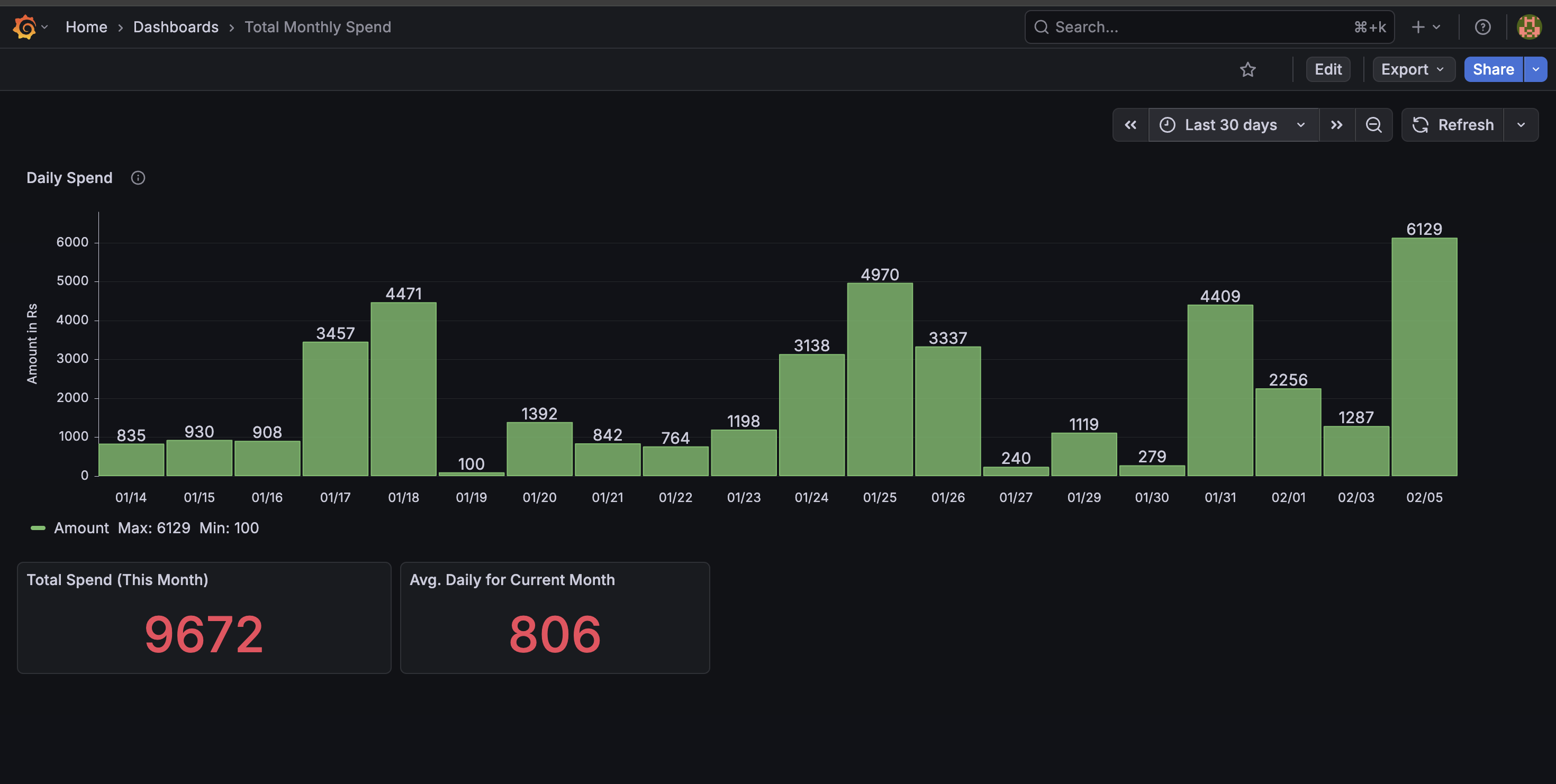
<p><img src="/assests/images/upi-spend-summary.png" alt="upi spend summary" /></p>

<h2 id="why-i-built-this-project">Why I Built This Project</h2>

<p>Like most people in India, a large part of my daily spending happens via UPI — small but frequent transactions across multiple merchants, apps, and bank accounts.</p>

<p>While banks and UPI apps show recent transactions, I felt a few gaps in my day-to-day life:</p>

<ul>
  <li>
    <p>No single place to see daily spend trends</p>
  </li>
  <li>
    <p>No easy way to answer:</p>

    <ul>
      <li>
        <p>Where did my money go today?</p>
      </li>
      <li>
        <p>Which merchant do I spend the most on?</p>
      </li>
    </ul>
  </li>
  <li>
    <p>No analytics, just raw transactions</p>
  </li>
  <li>
    <p>No historical view that felt visual and actionable</p>
  </li>
</ul>

<p>At the same time, I wanted to:</p>

<ul>
  <li>
    <p>Solve a real problem from my daily life</p>
  </li>
  <li>
    <p>Build something production-like</p>
  </li>
  <li>
    <p>Use modern data + infra tooling</p>
  </li>
  <li>
    <p>Learn by actually running the system end-to-end</p>
  </li>
  <li>
    <p>That’s how the UPI Daily Spend Tracker was born.</p>
  </li>
</ul>

<h2 id="high-level-architecture">High-Level Architecture</h2>

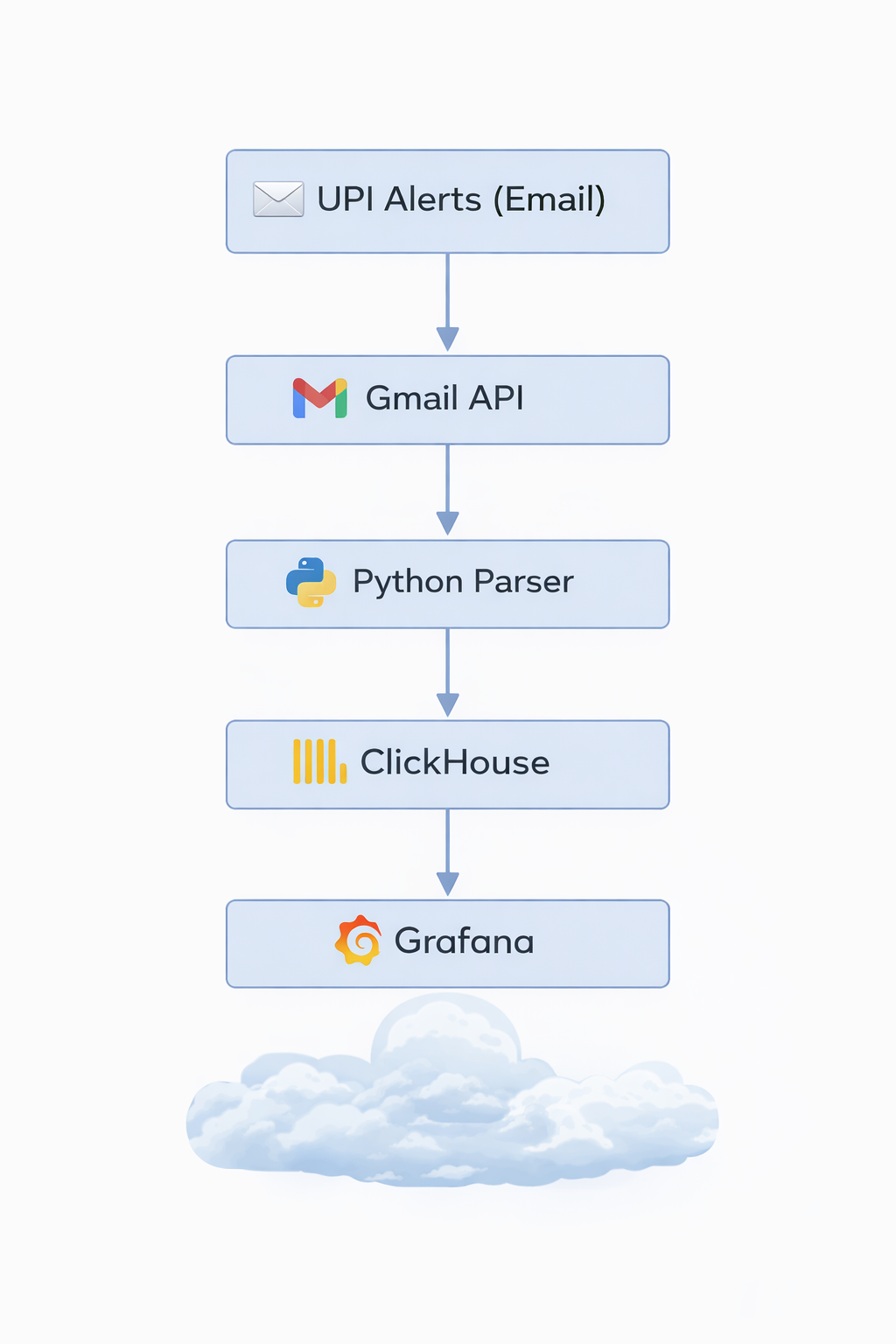
<p>At a high level, the system looks like this:</p>

<p><img src="/assests/images/upi-spend-arch.png" alt="upi spend arch" /></p>

<p>And everything runs on my self-hosted home server (An old intel Mac running 24*7 with the help of Amphetamine app), secured with HTTPS and can only be accessed using Tailscale VPN</p>

<h2 id="exposing-the-project-securely-duckdns--https">Exposing the Project Securely (DuckDNS + HTTPS)</h2>

<p>Since this runs on my home server, the first challenge was safe external access.</p>

<p>What I did:</p>

<ul>
  <li>
    <p>Used DuckDNS to get a stable DNS name for my home server</p>
  </li>
  <li>
    <p>Set up Nginx as a reverse proxy</p>
  </li>
  <li>
    <p>Enabled HTTPS using Let’s Encrypt</p>
  </li>
  <li>
    <p>Used Tailscale VPN</p>
  </li>
</ul>

<p>This gave me:</p>

<ul>
  <li>
    <p>A proper DNS name instead of IPs</p>
  </li>
  <li>
    <p>Encrypted access to Grafana</p>
  </li>
  <li>
    <p>A setup very similar to real-world deployments</p>
  </li>
</ul>

<p>This step alone taught me a lot about:</p>

<ul>
  <li>
    <p>TLS termination</p>
  </li>
  <li>
    <p>Reverse proxying internal services</p>
  </li>
  <li>
    <p>Running production-like infra at home</p>
  </li>
</ul>

<h2 id="authenticating-with-gmail-google-oauth">Authenticating with Gmail (Google OAuth)</h2>

<p>All UPI alerts land in my Gmail inbox, so Gmail became my source of truth.</p>

<p>Challenges:</p>

<ul>
  <li>
    <p>Gmail APIs require OAuth</p>
  </li>
  <li>
    <p>Tokens expire</p>
  </li>
  <li>
    <p>Refresh tokens must be handled carefully</p>
  </li>
</ul>

<p>What I implemented:</p>

<ul>
  <li>
    <p>Google OAuth flow to generate:</p>

    <ul>
      <li>
        <p>Access token</p>
      </li>
      <li>
        <p>Refresh token</p>
      </li>
    </ul>
  </li>
  <li>
    <p>Securely stored the refresh token</p>
  </li>
  <li>
    <p>Automatically refreshed access tokens when needed</p>
  </li>
</ul>

<p>Once this was in place, the system could:</p>

<ul>
  <li>
    <p>Access Gmail programmatically</p>
  </li>
  <li>
    <p>Run without manual intervention</p>
  </li>
</ul>

<h2 id="fetching-only-relevant-upi-emails">Fetching Only Relevant UPI Emails</h2>

<p>Instead of scraping everything, I kept it clean.</p>

<p>Strategy:</p>

<ul>
  <li>
    <p>Created Gmail labels for UPI transaction alerts</p>
  </li>
  <li>
    <p>Used Gmail API queries to fetch:</p>

    <ul>
      <li>
        <p>Only labeled emails</p>
      </li>
      <li>
        <p>Only new emails since last run</p>
      </li>
    </ul>
  </li>
</ul>

<p>This made the ingestion:</p>

<ul>
  <li>
    <p>Efficient</p>
  </li>
  <li>
    <p>Predictable</p>
  </li>
  <li>
    <p>Idempotent</p>
  </li>
</ul>

<h2 id="parsing-emails-into-structured-data">Parsing Emails into Structured Data</h2>

<p>UPI alert emails are semi-structured, not clean JSON.</p>

<p>So the parser extracts:</p>

<ul>
  <li>
    <p>Transaction amount</p>
  </li>
  <li>
    <p>Merchant name</p>
  </li>
  <li>
    <p>Account / bank</p>
  </li>
  <li>
    <p>Timestamp</p>
  </li>
  <li>
    <p>Transaction type (debit / credit)</p>
  </li>
</ul>

<p>This part was surprisingly fun — and very realistic:</p>

<ul>
  <li>
    <p>Regex + heuristics</p>
  </li>
  <li>
    <p>Handling different bank formats</p>
  </li>
  <li>
    <p>Guarding against partial failures</p>
  </li>
</ul>

<p>At the end of this step, every transaction becomes a clean event.</p>

<h2 id="storing-data-in-clickhouse">Storing Data in ClickHouse</h2>

<p>For analytics, I chose ClickHouse.</p>

<p>Why ClickHouse?</p>

<ul>
  <li>
    <p>Columnar</p>
  </li>
  <li>
    <p>Extremely fast for aggregates</p>
  </li>
  <li>
    <p>Perfect for time-series analytics</p>
  </li>
  <li>
    <p>Very low operational overhead</p>
  </li>
</ul>

<p>Schema highlights:</p>

<ul>
  <li>
    <p>Date</p>
  </li>
  <li>
    <p>Merchant</p>
  </li>
  <li>
    <p>Amount</p>
  </li>
  <li>
    <p>Account</p>
  </li>
  <li>
    <p>Transaction direction</p>
  </li>
</ul>

<p>Once data landed here, queries like:</p>

<ul>
  <li>
    <p>“Total spend today”</p>
  </li>
  <li>
    <p>“Top merchants this month”</p>
  </li>
  <li>
    <p>“Daily spend trend”</p>
  </li>
</ul>

<p>became trivial and fast.</p>

<h2 id="visualizing-with-grafana">Visualizing with Grafana</h2>

<p>This is where everything comes together. Dashboards include:</p>

<ul>
  <li>
    <p>Daily spend bar chart</p>
  </li>
  <li>
    <p>Total spend today</p>
  </li>
  <li>
    <p>Month-to-date spend</p>
  </li>
  <li>
    <p>Merchant-wise breakdown</p>
  </li>
  <li>
    <p>Drill-down Feature (My Favorite Part)</p>
  </li>
</ul>

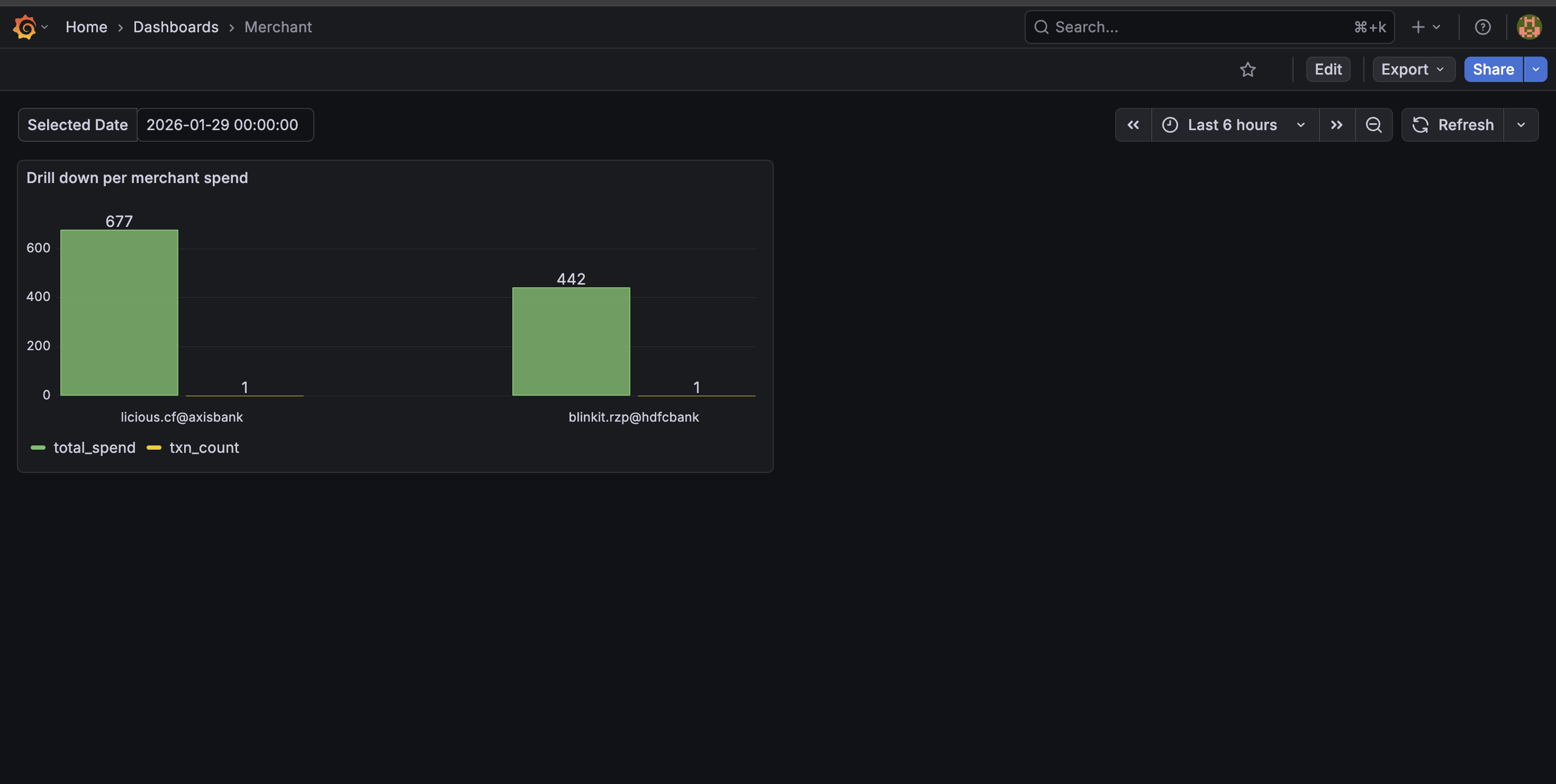
<p>Clicking on a day lets me:</p>

<ul>
  <li>Drill down into per-merchant spend</li>
</ul>

<p>Instantly answer:</p>

<ul>
  <li>Where did my money go on this specific day?</li>
</ul>

<p>This makes the dashboard interactive, not just pretty.</p>

<p><img src="/assests/images/merchant-drill-down.png" alt="merchant drill down" /></p>

<p>What the Dashboard Achieves; With one glance, I can now: Track spending patterns, Identify high-frequency merchants, Notice anomalies immediately ,Make more conscious spending decisions. And most importantly: I actually use this dashboard daily.</p>

<h2 id="daily-915-pm-spend-summary-email">Daily 9:15 PM Spend Summary Email</h2>

<p>Dashboards are useful — but they require you to open them. So I added a daily automated spend summary email that goes out every night at 9 PM to me and my wife. A scheduled job: Queries ClickHouse for total spend of the day, Generates a merchant-wise breakdown, Sends a clean summary via Gmail API. This turned the system from a passive dashboard into a proactive financial awareness tool. Now, instead of checking manually, we automatically get a concise snapshot of our daily spending.</p>

<p><img src="/assests/images/email-alert.png" alt="daily email alert" /></p>

<h2 id="work-in-progress-available-balance-via-kafka">Work in Progress: Available Balance via Kafka</h2>

<p>One feature I’m actively building: Real-time available balance tracking, balance change events produced to Kafka, Consumers update balance state, Grafana panel shows live available balance. This introduces: Event-driven architecture, Streaming instead of batch, Stateful processing</p>

<p>Still WIP — but intentionally so.</p>

<h2 id="what-i-learned-from-this-project">What I Learned from This Project</h2>

<p>This project touched almost every layer:</p>

<ul>
  <li>
    <p>OAuth &amp; APIs</p>
  </li>
  <li>
    <p>Secure networking (DNS, TLS, reverse proxy)</p>
  </li>
  <li>
    <p>Data ingestion pipelines</p>
  </li>
  <li>
    <p>Parsing messy real-world data</p>
  </li>
  <li>
    <p>Columnar analytics databases</p>
  </li>
  <li>
    <p>Visualization &amp; drilldowns</p>
  </li>
  <li>
    <p>Event-driven design (Kafka)</p>
  </li>
</ul>

<p>But the biggest takeaway:</p>

<p>The best projects come from solving your own problems.
This was built because I needed it — and that made all the difference.</p>]]></content><author><name></name></author><category term="projects" /><category term="upi" /><category term="clickhouse" /><category term="grafana" /><category term="python" /><category term="gmail-api" /><summary type="html"><![CDATA[UPI Daily Spend Tracker: Turning Daily Bank Alerts into Real-Time Analytics]]></summary></entry><entry><title type="html">Fixing Prod Query Slowdowns Caused by MySQL open_files_limit</title><link href="https://pankajtw.github.io/mysql/performance%20tuning/rca/2025/11/03/Prod-Issue-Due-To-Open-files-limit.html" rel="alternate" type="text/html" title="Fixing Prod Query Slowdowns Caused by MySQL open_files_limit" /><published>2025-11-03T00:00:00+00:00</published><updated>2025-11-03T00:00:00+00:00</updated><id>https://pankajtw.github.io/mysql/performance%20tuning/rca/2025/11/03/Prod-Issue-Due-To-Open-files-limit</id><content type="html" xml:base="https://pankajtw.github.io/mysql/performance%20tuning/rca/2025/11/03/Prod-Issue-Due-To-Open-files-limit.html"><![CDATA[<h2 id="-the-problem-queries-stuck-in-openingclosing-tables">🧩 The Problem: Queries Stuck in “Opening/Closing Tables”</h2>

<p>During peak traffic hours on our <strong>production MySQL primary</strong> (<code class="language-plaintext highlighter-rouge">prod-shard3-db01</code>), we started observing a sudden spike in query latency across multiple application services.<br />
<code class="language-plaintext highlighter-rouge">SHOW PROCESSLIST</code> revealed that <strong>most active queries</strong> were in the states:</p>

<div class="language-bash highlighter-rouge"><div class="highlight"><pre class="highlight"><code>|Opening tables | SELECT ... FROM tbl_abc ...... | 
|Opening tables | SELECT ... FROM tbl_lmn ...... |
|Closing tables | SELECT ... FROM tbl_xyz ...... |
</code></pre></div></div>

<p>and they were staying there unusually long — in some cases over several seconds.<br />
Application performance degraded sharply, with slow responses and intermittent timeouts.</p>

<h2 id="-first-observation-table-cache-thrashing">🔍 First Observation: Table Cache Thrashing</h2>

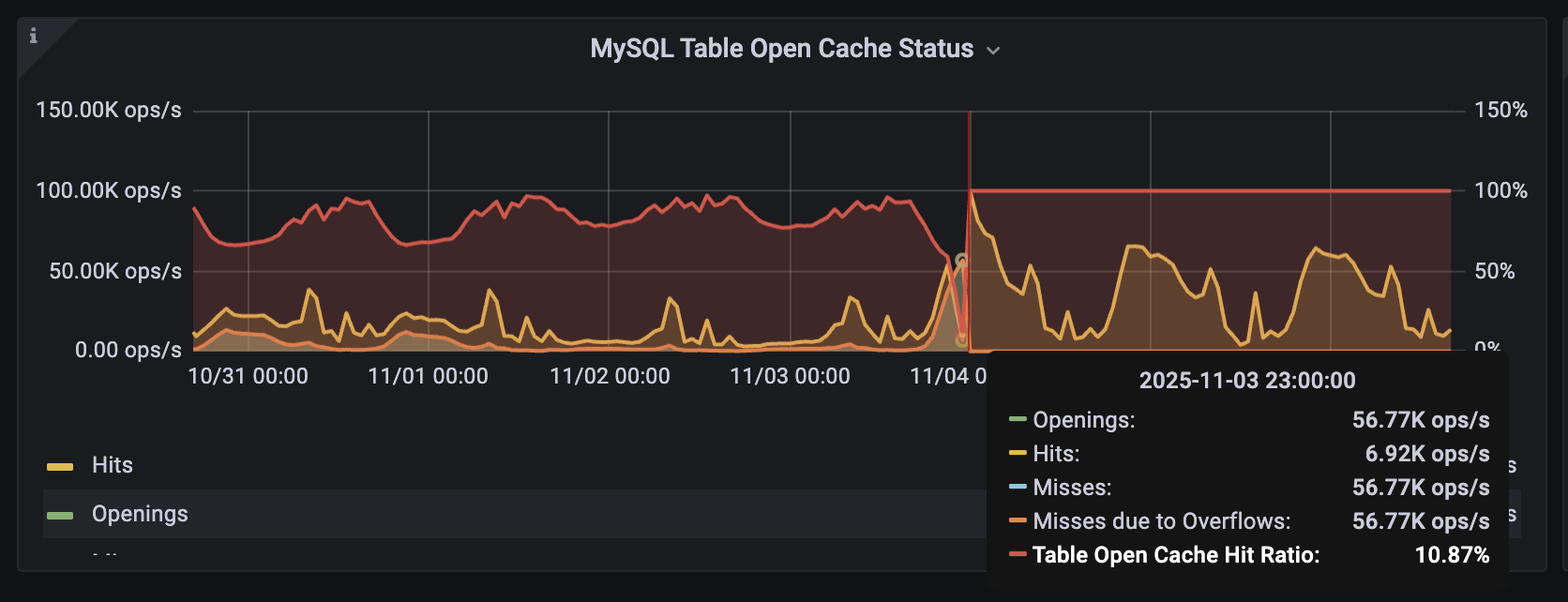
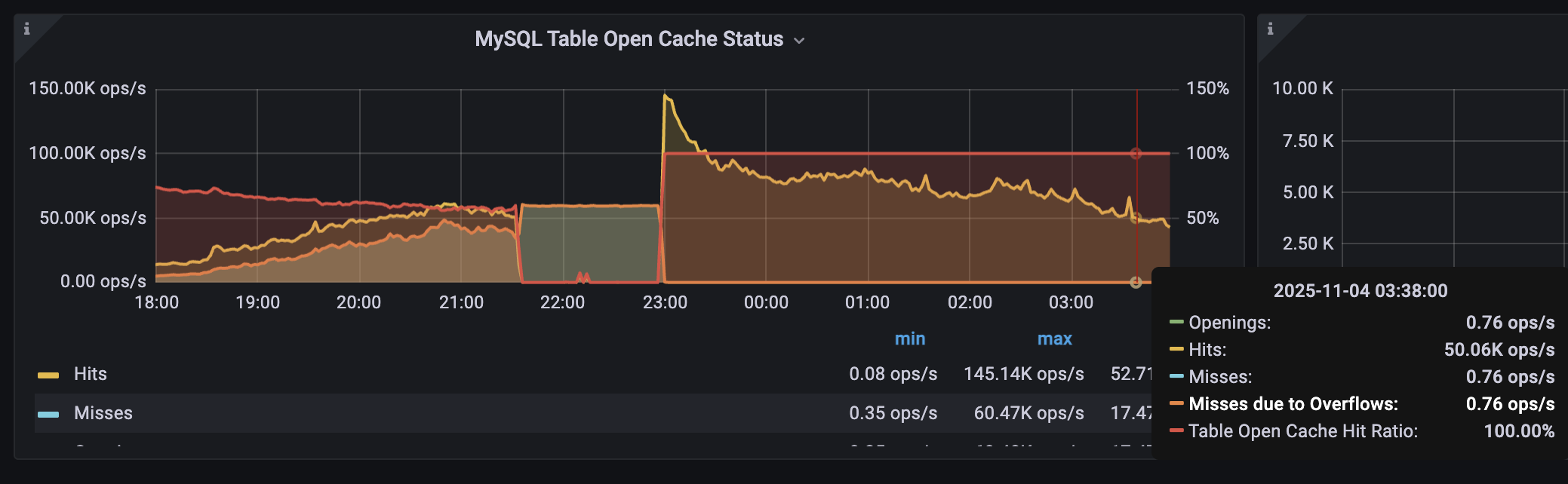
<p>Our PMM dashboard “MySQL Table Open Cache Status” confirmed the suspicion —<br />
the <strong>Table Open Cache hit ratio dropped to 10%</strong>, while <strong>misses due to overflows</strong> spiked sharply (~60K ops/sec).</p>

<p><img src="/assests/images/table_cache_misses.png" alt="table cache misses" /></p>

<p>In simple terms, MySQL was unable to reuse already-opened tables because its <strong>table_open_cache</strong> was <strong>too small</strong>.<br />
As a result, every query was <strong>opening and closing table descriptors</strong> repeatedly — a heavy overhead, especially under thousands of concurrent connections.</p>

<h2 id="️-step-1--first-fix-increase-table_open_cache-from-400--3000">⚙️ Step 1 — First Fix: Increase <code class="language-plaintext highlighter-rouge">table_open_cache</code> from 400 → 3000</h2>

<p>We initially noticed that the server had the following value:</p>

<div class="language-sql highlighter-rouge"><div class="highlight"><pre class="highlight"><code><span class="n">mysql</span><span class="o">&gt;</span> <span class="k">SHOW</span> <span class="k">GLOBAL</span> <span class="n">VARIABLES</span> <span class="k">LIKE</span> <span class="s1">'table_open_cache'</span><span class="p">;</span>
<span class="o">+</span><span class="c1">--------------------+-------+</span>
<span class="o">|</span> <span class="n">Variable_name</span>      <span class="o">|</span> <span class="n">Value</span> <span class="o">|</span>
<span class="o">+</span><span class="c1">--------------------+-------+</span>
<span class="o">|</span> <span class="n">table_open_cache</span>   <span class="o">|</span> <span class="mi">400</span>   <span class="o">|</span>
<span class="o">+</span><span class="c1">--------------------+-------+</span>
</code></pre></div></div>

<p>We increased it to 3000:</p>

<div class="language-sql highlighter-rouge"><div class="highlight"><pre class="highlight"><code><span class="k">SET</span> <span class="n">PERSIST</span> <span class="n">table_open_cache</span> <span class="o">=</span> <span class="mi">3000</span><span class="p">;</span>
</code></pre></div></div>

<p>Almost immediately, the “Opening tables” entries in the processlist began to disappear and most queries started executing normally again.</p>

<p>However, in PMM we could still see cache misses and a few overflow spikes, indicating that MySQL was still occasionally running out of cached table descriptors during high load.</p>

<h2 id="️-step-2--final-fix-increase-table_open_cache-to-8192">⚙️ Step 2 — Final Fix: Increase table_open_cache to 8192</h2>

<p>We further bumped the value to 8192:</p>

<div class="language-sql highlighter-rouge"><div class="highlight"><pre class="highlight"><code><span class="k">SET</span> <span class="n">PERSIST</span> <span class="n">table_open_cache</span> <span class="o">=</span> <span class="mi">8192</span><span class="p">;</span>
</code></pre></div></div>

<p>This completely stabilized the cache behavior — the Table Open Cache Hit Ratio went to 100%,
and misses and overflows dropped to zero.</p>

<p><img src="/assests/images/table_cache_hits.png" alt="table cache hits" /></p>

<p>Application latency normalized immediately, and the MySQL Opened_tables status variable remained steady verfied from</p>

<div class="language-sql highlighter-rouge"><div class="highlight"><pre class="highlight"><code><span class="k">show</span> <span class="k">global</span> <span class="n">status</span> <span class="k">like</span> <span class="s1">'opened_tables'</span>
</code></pre></div></div>

<h2 id="-but-why-was-table_open_cache-so-small-initially">🧐 But Why Was table_open_cache So Small Initially?</h2>

<p>Here’s where it got interesting.</p>

<p>When we originally had attempted to configure in the my.cnf file below values few weeks back:</p>

<div class="language-bash highlighter-rouge"><div class="highlight"><pre class="highlight"><code>table_open_cache <span class="o">=</span> 40000
max_connections  <span class="o">=</span> 10000
</code></pre></div></div>

<p>MySQL refussed it and logged below warnings in the error log</p>

<div class="language-bash highlighter-rouge"><div class="highlight"><pre class="highlight"><code>2025-10-01T20:38:20.318797Z 0 <span class="o">[</span>Warning] <span class="o">[</span>MY-010140] <span class="o">[</span>Server] Could not increase number of max_open_files to more than 10000 <span class="o">(</span>request: 386641<span class="o">)</span>
2025-10-01T20:38:20.318801Z 0 <span class="o">[</span>Warning] <span class="o">[</span>MY-010141] <span class="o">[</span>Server] Changed limits: max_connections: 9190 <span class="o">(</span>requested 10000<span class="o">)</span>
2025-10-01T20:38:20.318804Z 0 <span class="o">[</span>Warning] <span class="o">[</span>MY-010142] <span class="o">[</span>Server] Changed limits: table_open_cache: 400 <span class="o">(</span>requested 40000<span class="o">)</span>
</code></pre></div></div>

<p>The root cause?</p>

<p>The OS-level open file limit for the MySQL service (mysqld) was capped at 10,000.
Since each table and connection consumes file descriptors, MySQL could not honor the higher cache and connection settings, and it automatically reduced table_open_cache down to 400.</p>

<div class="language-bash highlighter-rouge"><div class="highlight"><pre class="highlight"><code>root@prod-shard3-db01:/home/pankaj# <span class="nv">pid</span><span class="o">=</span><span class="si">$(</span>pidof mysqld<span class="si">)</span>
root@prod-shard3-db01:/home/pankaj# <span class="nb">cat</span> /proc/<span class="nv">$pid</span>/limits | <span class="nb">awk</span> <span class="s1">'NR==1 || /open files/'</span>
Limit                     Soft Limit           Hard Limit           Units     
Max open files            10000                10000                files
</code></pre></div></div>

<h2 id="️-discovery-the-limitnofileinfinity-that-never-took-effect">⚠️ Discovery: The “LimitNOFILE=Infinity” That Never Took Effect</h2>

<p>While reviewing configuration, we found that a systemd override had already been created at:</p>

<div class="language-bash highlighter-rouge"><div class="highlight"><pre class="highlight"><code>/etc/systemd/system/mysql.service.d/override.conf
</code></pre></div></div>
<p>with the content:</p>
<div class="language-bash highlighter-rouge"><div class="highlight"><pre class="highlight"><code><span class="o">[</span>Service]
<span class="nv">LimitNOFILE</span><span class="o">=</span>Infinity
</code></pre></div></div>

<p>At first glance, this should have allowed MySQL to open unlimited file descriptors. That’s when we realized the catch:
the MySQL service was never restarted after adding the override file.
The LimitNOFILE=Infinity directive was not yet applied to the running systemd service. We verfied this by comparing mysql uptime (mysqladmin status), with the commit timestamp for the change made to the override file.</p>

<h2 id="-step-3--restart-to-apply-the-systemd-override">🔄 Step 3 — Restart to Apply the Systemd Override</h2>

<p>After restarting the MySQL service during a maintenance window:</p>

<div class="language-bash highlighter-rouge"><div class="highlight"><pre class="highlight"><code>systemctl restart mysql
</code></pre></div></div>

<p>The new limit took effect successfully:</p>

<div class="language-bash highlighter-rouge"><div class="highlight"><pre class="highlight"><code><span class="nb">cat</span> /proc/<span class="si">$(</span>pidof mysqld<span class="si">)</span>/limits | <span class="nb">grep</span> <span class="s2">"open files"</span>
Max open files: 1048576
</code></pre></div></div>

<p>Now the OS-level limit comfortably supported our desired table_open_cache and max_connections values.</p>

<h2 id="-summary">🧠 Summary</h2>

<p>This incident reinforced how MySQL performance tuning is as much about the OS layer as it is about MySQL itself.</p>

<p>A small table_open_cache combined with a tight open_files_limit caused thousands of queries to waste time repeatedly opening and closing tables.
A few simple configuration adjustments — increasing table_open_cache and correctly applying the LimitNOFILE=Infinity override — brought the system back to full health.</p>]]></content><author><name></name></author><category term="MySQL" /><category term="Performance Tuning" /><category term="RCA" /><category term="mysql" /><category term="table_open_cache" /><category term="open_files_limit" /><category term="performance" /><category term="pmm" /><category term="production-issue" /><summary type="html"><![CDATA[A real-world production incident where a small table_open_cache caused severe query slowdowns, how we diagnosed it, and what fixed it.]]></summary></entry><entry><title type="html">How pt-heartbeat Log Rotation Caused Disk Space Bloat on Our MySQL Nodes</title><link href="https://pankajtw.github.io/mysql/percona/monitoring/linux/2025/10/10/pt-heartbeat-log-rotation-disk-space-bloat.html" rel="alternate" type="text/html" title="How pt-heartbeat Log Rotation Caused Disk Space Bloat on Our MySQL Nodes" /><published>2025-10-10T00:00:00+00:00</published><updated>2025-10-10T00:00:00+00:00</updated><id>https://pankajtw.github.io/mysql/percona/monitoring/linux/2025/10/10/pt-heartbeat-log-rotation-disk-space-bloat</id><content type="html" xml:base="https://pankajtw.github.io/mysql/percona/monitoring/linux/2025/10/10/pt-heartbeat-log-rotation-disk-space-bloat.html"><![CDATA[<p>We recently faced a subtle but critical disk space bloat issue on one of our MySQL production nodes, and the root cause turned out to be how <strong>Percona’s <code class="language-plaintext highlighter-rouge">pt-heartbeat</code></strong> handles logging during log rotation. This blog details the original setup, what went wrong, and the fix that worked for us.</p>

<hr />

<h2 id="original-setup-pt-heartbeat-as-a-systemd-service">Original Setup: <code class="language-plaintext highlighter-rouge">pt-heartbeat</code> as a Systemd Service</h2>

<p>We had <code class="language-plaintext highlighter-rouge">pt-heartbeat</code> running as a systemd service on both primary and replica MySQL servers to monitor replication lag.</p>

<p>On the <strong>primary</strong>, it runs in update mode:</p>

<div class="language-bash highlighter-rouge"><div class="highlight"><pre class="highlight"><code>/usr/bin/pt-heartbeat <span class="se">\</span>
  <span class="nt">--database</span><span class="o">=</span>percona <span class="nt">--table</span><span class="o">=</span>heartbeat <span class="se">\</span>
  <span class="nt">--sentinel</span><span class="o">=</span>/tmp/pt-heartbeat-sentinel <span class="se">\</span>
  <span class="nt">--log</span><span class="o">=</span>/var/log/mysql/pt-heartbeat.log <span class="se">\</span>
  <span class="nt">--interval</span><span class="o">=</span>0.01 <span class="nt">--update</span>
</code></pre></div></div>

<p>On replicas, it runs with –monitor.</p>

<p>We defined the log path explicitly using the –log flag and rotated logs using /etc/logrotate.d/mysql, which included a wildcard:</p>

<div class="language-bash highlighter-rouge"><div class="highlight"><pre class="highlight"><code>/var/log/mysql/<span class="k">*</span>.log /var/log/mysql/<span class="k">*</span>.err <span class="o">{</span>
    ...
    compress
    size 100M
    rotate 5
    ...
<span class="o">}</span>
</code></pre></div></div>

<h2 id="the-issue-disk-space-bloat-due-to-orphaned-file-descriptors">The Issue: Disk Space Bloat Due to Orphaned File Descriptors</h2>

<p>Over time, we started getting disk space alerts on the root volume (/) of some DB nodes, even though:</p>

<p>/var/log/mysql/pt-heartbeat.log showed 0 bytes, and the .gz rotated files were regularly compressed.</p>

<div class="language-bash highlighter-rouge"><div class="highlight"><pre class="highlight"><code>root@prod-mysql-01:/home/pakumar# <span class="nb">ls</span> <span class="nt">-lah</span> /var/log/mysql/pt-heartbea<span class="k">*</span>

<span class="nt">-rw-r--r--</span> 1 root root 0 Aug 20 00:00 /var/log/mysql/pt-heartbeat.log 
<span class="nt">-rw-r--r--</span> 1 root root 39M Aug 19 23:59 /var/log/mysql/pt-heartbeat.log.1.gz 
<span class="nt">-rw-r--r--</span> 1 root root 56M Jul 4 00:00 /var/log/mysql/pt-heartbeat.log.2.gz 
<span class="nt">-rw-r--r--</span> 1 root root 49K May 22 09:26 /var/log/mysql/pt-heartbeat.log.3.gz 
<span class="nt">-rw-r--r--</span> 1 root root 29M May 20 00:00 /var/log/mysql/pt-heartbeat.log.4.gz 
<span class="nt">-rw-r--r--</span> 1 root root 1.8M Jul 31 2024 /var/log/mysql/pt-heartbeat.log.5.gz
</code></pre></div></div>

<p>Despite this, a df -h / showed &gt;90% usage, and we noticed space was only freed when we manually restarted the pt-heartbeat service:</p>

<div class="language-bash highlighter-rouge"><div class="highlight"><pre class="highlight"><code>systemctl restart pt-heartbeat.service
</code></pre></div></div>

<h2 id="root-cause">Root Cause</h2>

<p>When logrotate rotates pt-heartbeat.log, it:</p>

<ul>
  <li>
    <p>Renames the current log file to .log.1</p>
  </li>
  <li>
    <p>Creates a new, empty .log</p>
  </li>
  <li>
    <p>Compresses old logs as .gz</p>
  </li>
</ul>

<p>However, pt-heartbeat doesn’t reopen the log file automatically. It keeps writing to the old file descriptor — which is no longer linked to a filename on disk.</p>

<p>This results in a classic orphaned inode situation:</p>

<ul>
  <li>
    <p>File is “deleted” (renamed and compressed)</p>
  </li>
  <li>
    <p>But space is still consumed until the writing process (pt-heartbeat) is restarted</p>
  </li>
</ul>

<h2 id="the-fix-dedicated-logrotate--systemd-restart">The Fix: Dedicated Logrotate + Systemd Restart</h2>

<p>To solve this cleanly and permanently, we made two key changes:</p>

<ol>
  <li>Created a separate logrotate config for pt-heartbeat</li>
</ol>

<p>We moved its log handling out of the MySQL block:</p>

<div class="language-bash highlighter-rouge"><div class="highlight"><pre class="highlight"><code>/etc/logrotate.d/pt-heartbeat
bash

<span class="sb">```</span>bash
/var/log/mysql/pt-heartbeat.log <span class="o">{</span>
    notifempty
    size 100M
    rotate 7
    compress
    missingok
    copytruncate
    sharedscripts
    postrotate
        <span class="k">if </span>systemctl is-active <span class="nt">--quiet</span> pt-heartbeat-primary.service<span class="p">;</span> <span class="k">then
            </span>systemctl restart pt-heartbeat-primary.service
        <span class="k">fi
        if </span>systemctl is-active <span class="nt">--quiet</span> pt-heartbeat-replica.service<span class="p">;</span> <span class="k">then
            </span>systemctl restart pt-heartbeat-replica.service
        <span class="k">fi
    </span>endscript
<span class="o">}</span>
</code></pre></div></div>

<ol>
  <li>Excluded pt-heartbeat.log from the MySQL logrotate config</li>
</ol>

<p>We updated /etc/logrotate.d/mysql:</p>

<div class="language-bash highlighter-rouge"><div class="highlight"><pre class="highlight"><code>/var/log/mysql/<span class="k">*</span>.log
<span class="o">!</span> /var/log/mysql/pt-heartbeat.log
/var/log/mysql/<span class="k">*</span>.err
</code></pre></div></div>

<p>This prevents accidental double-rotation or compression of the same file.</p>

<h2 id="outcome">Outcome</h2>

<p>After implementing the fix:</p>

<ul>
  <li>
    <p>Disk usage immediately dropped from 91% to 34%</p>
  </li>
  <li>
    <p>pt-heartbeat.log is now rotated cleanly</p>
  </li>
  <li>
    <p>Old log file descriptors are released after every rotation</p>
  </li>
  <li>
    <p>No more manual restarts or space alerts</p>
  </li>
</ul>

<h2 id="takeaways">Takeaways</h2>

<ul>
  <li>
    <p>Long-running services like pt-heartbeat won’t reopen logs unless restarted.</p>
  </li>
  <li>
    <p>Logrotate must coordinate with service restarts, especially for tools that don’t support SIGHUP-based log reopening.</p>
  </li>
  <li>
    <p>Exclude such logs from broader rotation scripts (like mysql.log) to prevent side effects.</p>
  </li>
</ul>]]></content><author><name></name></author><category term="MySQL" /><category term="Percona" /><category term="Monitoring" /><category term="Linux" /><category term="pt-heartbeat" /><category term="logrotate" /><category term="systemd" /><category term="file-descriptor" /><category term="disk-space" /><summary type="html"><![CDATA[We recently faced a subtle but critical disk space bloat issue on one of our MySQL production nodes, and the root cause turned out to be how Percona’s pt-heartbeat handles logging during log rotation. This blog details the original setup, what went wrong, and the fix that worked for us.]]></summary></entry><entry><title type="html">Unexpected MySQL Restarts on Ubuntu 24.04: The needrestart Change</title><link href="https://pankajtw.github.io/mysql/ubuntu/devops/2025/10/03/Unexpected-MySQL-Restarts.html" rel="alternate" type="text/html" title="Unexpected MySQL Restarts on Ubuntu 24.04: The needrestart Change" /><published>2025-10-03T00:00:00+00:00</published><updated>2025-10-03T00:00:00+00:00</updated><id>https://pankajtw.github.io/mysql/ubuntu/devops/2025/10/03/Unexpected-MySQL-Restarts</id><content type="html" xml:base="https://pankajtw.github.io/mysql/ubuntu/devops/2025/10/03/Unexpected-MySQL-Restarts.html"><![CDATA[<h2 id="background">Background</h2>

<p>After upgrading some of our production servers to <strong>Ubuntu 24.04 (Noble)</strong>, we began noticing <strong>unexpected MySQL restarts</strong> during routine package updates.<br />
This was extremely concerning because these restarts happened <em>without any DBA action</em> and caused disruption on live workloads.</p>

<p>On investigation, we found the culprit: a change in the behavior of the <a href="https://discourse.ubuntu.com/t/needrestart-changes-in-ubuntu-24-04-service-restarts/44671"><code class="language-plaintext highlighter-rouge">needrestart</code></a> package.</p>

<hr />

<p>In Ubuntu 24.04, <code class="language-plaintext highlighter-rouge">needrestart</code> now restarts services automatically during <code class="language-plaintext highlighter-rouge">apt upgrade</code> or <code class="language-plaintext highlighter-rouge">unattended-upgrades</code>. Previously, in non-interactive mode, it only reported which services needed restarting but <strong>did not actually restart them</strong>.
This change was meant to improve patch hygiene, but for production databases, it’s dangerous—because MySQL can be bounced in the middle of heavy traffic.</p>

<hr />

<h2 id="symptoms-we-observed">Symptoms We Observed</h2>

<p>Here’s what we saw in the <strong>MySQL error log</strong>:</p>

<div class="language-text highlighter-rouge"><div class="highlight"><pre class="highlight"><code>2025-09-23T06:03:25.902608Z 0 [System] [MY-013172] [Server] Received SHUTDOWN from user &lt;via user signal&gt;.
Shutting down mysqld (Version: 8.0.43-34).
</code></pre></div></div>

<p>There was no corresponding high load, crash, or OOM event.<br />
Instead, in <code class="language-plaintext highlighter-rouge">/var/log/messages</code> we saw systemd/dbus activity triggered during package operations:</p>

<div class="language-text highlighter-rouge"><div class="highlight"><pre class="highlight"><code>2025-09-23T06:03:25.424042+00:00 mysql-prod-shard dbus-daemon[2045]: [system] Activating via systemd: service name='org.freedesktop.PackageKit' unit='packagekit.service' requested by ':1.297' (uid=0 pid=1227540 comm="/usr/bin/gdbus call --system --dest org.freedesktop.PackageKit" label="unconfined")
</code></pre></div></div>
<p>This confirmed that it was <strong>not an internal MySQL crash</strong> but an <strong>external restart trigger</strong>.</p>

<p>We later saw similar patterns across multiple servers whenever unattended upgrades applied security patches.</p>

<hr />

<h2 id="the-root-cause">The Root Cause</h2>

<ul>
  <li>Ubuntu 24.04 ships <code class="language-plaintext highlighter-rouge">needrestart</code> with new defaults.</li>
  <li>The <code class="language-plaintext highlighter-rouge">/etc/apt/apt.conf.d/99needrestart</code> file included the <code class="language-plaintext highlighter-rouge">-m u</code> flag, which forces automatic restarts of affected services during upgrades.</li>
  <li>MySQL was one of those services.</li>
</ul>

<hr />

<h2 id="the-fix-we-applied">The Fix We Applied</h2>

<p>We restored the old behavior by <strong>editing</strong>:</p>

<p><strong>File:</strong> <code class="language-plaintext highlighter-rouge">/etc/apt/apt.conf.d/99needrestart</code></p>

<h3 id="before">Before</h3>

<div class="language-bash highlighter-rouge"><div class="highlight"><pre class="highlight"><code>DPKg::Post-Invoke <span class="o">{</span> <span class="s2">"if [ -x /usr/sbin/needrestart ]; then /usr/sbin/needrestart -m u; fi"</span><span class="p">;</span> <span class="o">}</span><span class="p">;</span>
</code></pre></div></div>

<h3 id="after">After</h3>

<div class="language-bash highlighter-rouge"><div class="highlight"><pre class="highlight"><code>DPKg::Post-Invoke <span class="o">{</span> <span class="s2">"if [ -x /usr/sbin/needrestart ]; then /usr/sbin/needrestart; fi"</span><span class="p">;</span> <span class="o">}</span><span class="p">;</span>
</code></pre></div></div>

<p>This disables the forced auto-restart and brings back the safer reporting-only behavior.</p>

<hr />

<h2 id="recommendations">Recommendations</h2>

<ul>
  <li>If you run <strong>production databases</strong> on Ubuntu 24.04, be aware of this <code class="language-plaintext highlighter-rouge">needrestart</code> change.</li>
  <li>Either:
    <ul>
      <li>Remove the <code class="language-plaintext highlighter-rouge">-m u</code> flag (global rollback to old behavior), <strong>or</strong></li>
      <li>Configure <code class="language-plaintext highlighter-rouge">/etc/needrestart/conf.d/</code> overrides to exempt critical services like <code class="language-plaintext highlighter-rouge">mysql.service</code>.</li>
    </ul>
  </li>
  <li>Avoid unattended restarts on DB servers—schedule controlled maintenance windows for patching.</li>
</ul>

<hr />

<h2 id="closing-thoughts">Closing Thoughts</h2>

<p>What looked like random MySQL crashes turned out to be a <strong>silent policy change in Ubuntu 24.04</strong>.<br />
Lesson learned: **always review the upgrade notes and the features introduced before doing an OS upgrade for your critical services</p>

<p>This experience reinforced our principle:<br />
<em>Production DBs must never be restarted automatically by the OS.</em></p>

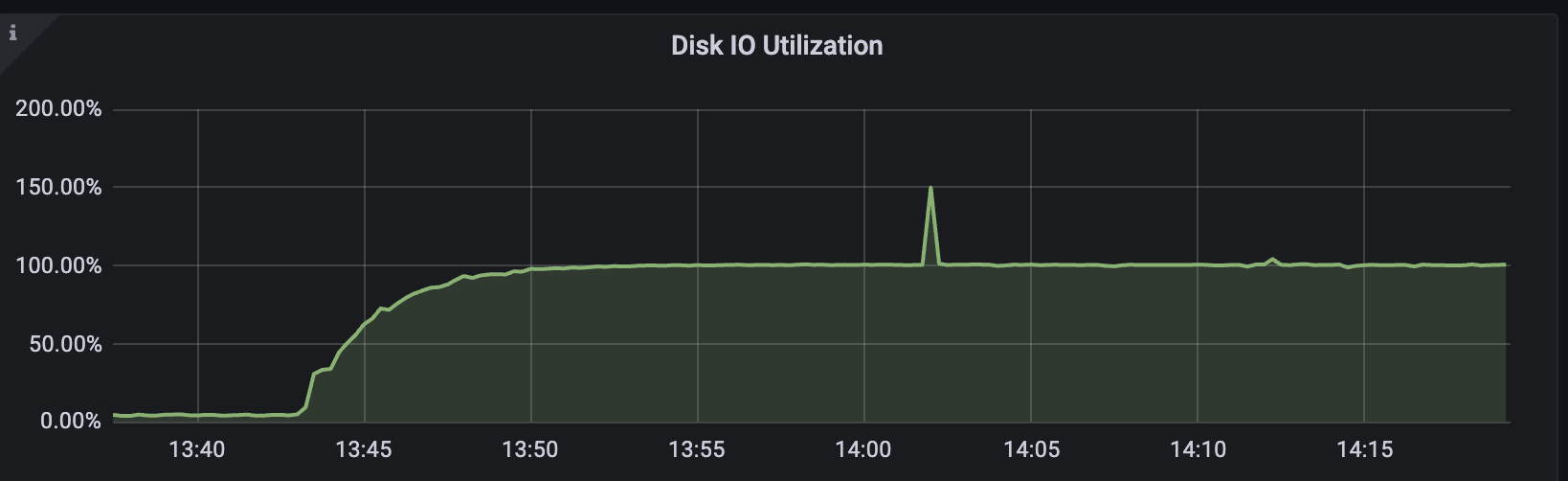
<p>Have you faced something similar on Ubuntu 24.04? Let me know in the comments.</p>]]></content><author><name></name></author><category term="mysql" /><category term="ubuntu" /><category term="devops" /><summary type="html"><![CDATA[Background]]></summary></entry><entry><title type="html">How innodb-flush-log-at-trx-commit saved the day</title><link href="https://pankajtw.github.io/2025/08/18/How-InnoDB-flush-log-at-trx-commit-saved-the-day.html" rel="alternate" type="text/html" title="How innodb-flush-log-at-trx-commit saved the day" /><published>2025-08-18T12:00:00+00:00</published><updated>2025-08-18T12:00:00+00:00</updated><id>https://pankajtw.github.io/2025/08/18/How-InnoDB-flush-log-at-trx-commit-saved-the-day</id><content type="html" xml:base="https://pankajtw.github.io/2025/08/18/How-InnoDB-flush-log-at-trx-commit-saved-the-day.html"><![CDATA[<p>During a recent performance test on one of my MySQL instances, I noticed the <strong>Disk I/O Utilization graph pegged at 100%</strong>. Queries started slowing down, and it was clear the instance was hitting an I/O bottleneck.</p>

<p><img src="/assests/images/io_spike.png" alt="Disk IO Utilization Graph" /></p>

<h2 id="step-1-spotting-the-symptom">Step 1: Spotting the Symptom</h2>

<p>Grafana first alerted me that something was off:</p>

<p>The utilization graph climbed steadily until it flatlined at 100%. Something inside MySQL was hammering the disk.</p>

<h2 id="step-2-os-level-debugging">Step 2: OS-Level Debugging</h2>

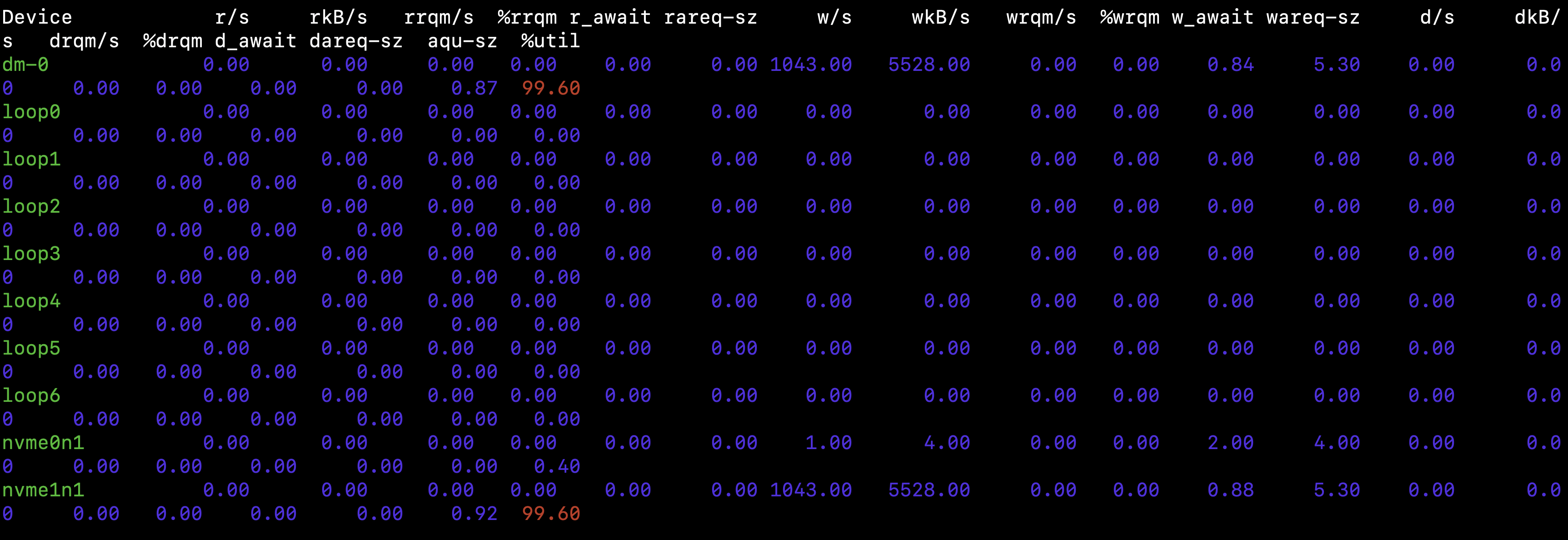
<p>I logged into the Ubuntu server and started with <code class="language-plaintext highlighter-rouge">iostat</code>:</p>

<div class="language-bash highlighter-rouge"><div class="highlight"><pre class="highlight"><code>iostat <span class="nt">-x</span> 1 5
</code></pre></div></div>

<p><img src="/assests/images/iostat.png" alt="iostat output" /></p>

<p>The output showed:</p>

<ul>
  <li>
    <p>%util on nvme1n1 / dm-0 → 99-100%</p>
  </li>
  <li>
    <p>Very high writes/sec (~1000+) with tiny block sizes (~5 KB)</p>
  </li>
  <li>
    <p>Almost no reads happening</p>
  </li>
</ul>

<p>This pointed to frequent small write flushes saturating the disk, not big sequential reads/writes.</p>

<h2 id="step-3-looking-inside-mysql">Step 3: Looking Inside MySQL</h2>

<p>Next, I turned to MySQL internals. I checked the InnoDB log flush setting:</p>

<div class="language-sql highlighter-rouge"><div class="highlight"><pre class="highlight"><code><span class="k">SHOW</span> <span class="n">VARIABLES</span> <span class="k">LIKE</span> <span class="s1">'innodb_flush_log_at_trx_commit'</span><span class="p">;</span>
</code></pre></div></div>

<p>It was set to 1 (the default), which meant:</p>

<ul>
  <li>InnoDB writes and flushes the redo log to disk at every single transaction commit.</li>
  <li>Guarantees durability (ACID compliance).</li>
  <li>But with lots of small transactions, this results in one fsync per commit → death by IOPS.</li>
</ul>

<p>This perfectly explained the 5 KB writes and the saturated disk.</p>

<h2 id="step-4-the-fix">Step 4: The Fix</h2>

<p>I changed the parameter to 2:</p>

<div class="language-sql highlighter-rouge"><div class="highlight"><pre class="highlight"><code><span class="k">SET</span> <span class="n">persist</span> <span class="n">innodb_flush_log_at_trx_commit</span> <span class="o">=</span> <span class="mi">2</span><span class="p">;</span>
</code></pre></div></div>
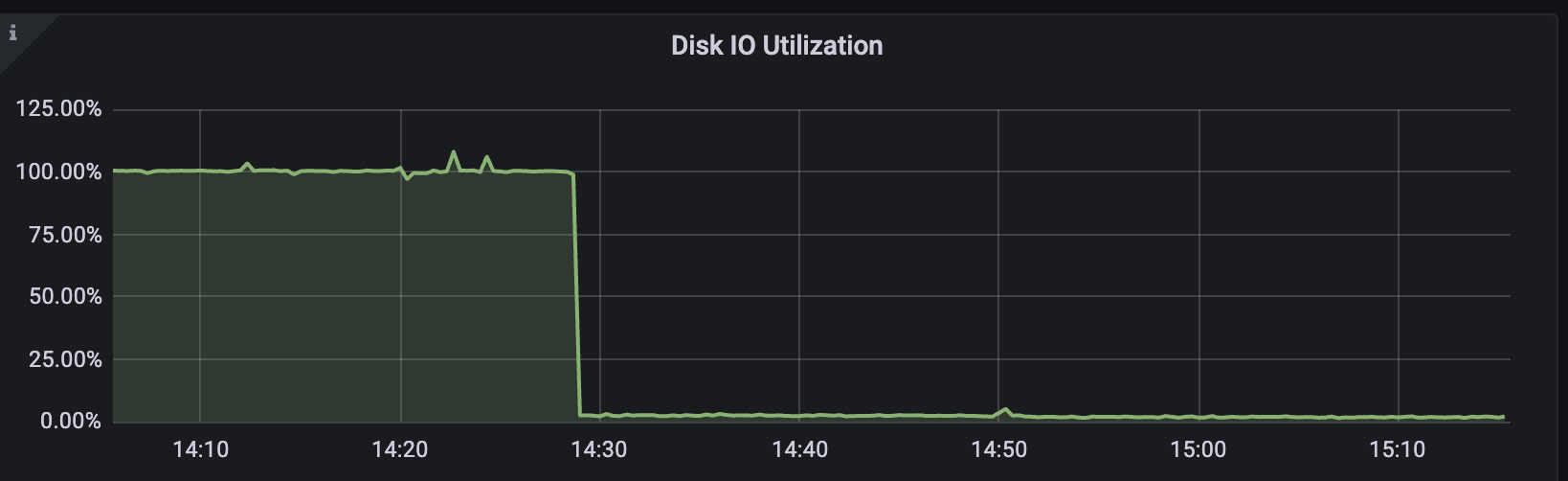
<p>With this setting, InnoDB still writes logs at every commit but only flushes them to disk once per second.</p>

<p>Result?</p>

<p>Disk utilization plummeted from 100% to almost idle instantly.</p>

<p><img src="/assests/images/io_down.png" alt="disk io down" /></p>

<h2 id="step-5-why-this-works">Step 5: Why This Works</h2>

<p>Here’s the difference:</p>

<p>=1 → Every commit = redo log write + fsync → extremely high IOPS, guaranteed durability.</p>

<p>=2 → Redo log write per commit, fsync once per second → huge IOPS savings, but risk of losing up to 1 second of transactions in case of a crash.</p>

<h2 id="final-thoughts">Final Thoughts</h2>

<p>This was a good reminder that MySQL’s default settings are tuned for safety, not performance. Knowing how InnoDB’s redo log flushing works, and when to adjust it, can save you from unnecessary I/O bottlenecks.</p>

<p>In my case, simply switching innodb_flush_log_at_trx_commit from 1 to 2 allowed me to bring disk utilization down and continue stress testing without hitting hardware limits.</p>]]></content><author><name></name></author><category term="jekyll" /><category term="github-pages" /><category term="blogging" /><category term="mysql" /><category term="disk IO" /><category term="innodb" /><category term="databases" /><summary type="html"><![CDATA[During a recent performance test on one of my MySQL instances, I noticed the Disk I/O Utilization graph pegged at 100%. Queries started slowing down, and it was clear the instance was hitting an I/O bottleneck.]]></summary></entry><entry><title type="html">MySQL to RDS Replication Script using XtraBackup and S3</title><link href="https://pankajtw.github.io/2025/06/04/RDS-Replication-Script.html" rel="alternate" type="text/html" title="MySQL to RDS Replication Script using XtraBackup and S3" /><published>2025-06-04T00:00:00+00:00</published><updated>2025-06-04T00:00:00+00:00</updated><id>https://pankajtw.github.io/2025/06/04/RDS-Replication-Script</id><content type="html" xml:base="https://pankajtw.github.io/2025/06/04/RDS-Replication-Script.html"><![CDATA[<p>Setting up a disaster recovery (DR) pipeline between your on-premise MySQL database and Amazon RDS can be a game-changer for data resilience. In this blog, I’ll walk through how I automated a reliable backup + replication process using Percona XtraBackup, AWS S3, and RDS’s restore-from-S3 capability.</p>

<hr />

<h2 id="goal">Goal</h2>

<p>Build a script to:</p>

<ul>
  <li>Take a full backup of MySQL using <code class="language-plaintext highlighter-rouge">xtrabackup</code></li>
  <li>Split and upload it to Amazon S3 in parallel</li>
  <li>Restore the backup to a fresh RDS instance</li>
  <li>Set up GTID-based replication to start syncing with the on-prem master</li>
</ul>

<hr />

<h2 id="pre-requisites">Pre-requisites</h2>

<ol>
  <li><strong>AWS CLI Setup</strong>
    <div class="language-bash highlighter-rouge"><div class="highlight"><pre class="highlight"><code> aws configure
</code></pre></div>    </div>
  </li>
  <li><strong>IAM Role for RDS Ingestion</strong>
    <ul>
      <li>Create a role with <code class="language-plaintext highlighter-rouge">AmazonS3ReadOnlyAccess</code></li>
      <li>Add this trust policy:
        <div class="language-json highlighter-rouge"><div class="highlight"><pre class="highlight"><code><span class="w"> </span><span class="p">{</span><span class="w">
</span><span class="nl">"Effect"</span><span class="p">:</span><span class="w"> </span><span class="s2">"Allow"</span><span class="p">,</span><span class="w">
</span><span class="nl">"Principal"</span><span class="p">:</span><span class="w"> </span><span class="p">{</span><span class="w"> </span><span class="nl">"Service"</span><span class="p">:</span><span class="w"> </span><span class="s2">"rds.amazonaws.com"</span><span class="w"> </span><span class="p">},</span><span class="w">
</span><span class="nl">"Action"</span><span class="p">:</span><span class="w"> </span><span class="s2">"sts:AssumeRole"</span><span class="w">
 </span><span class="p">}</span><span class="w">
</span></code></pre></div>        </div>
      </li>
    </ul>
  </li>
  <li><strong>MySQL Backup User</strong>
    <div class="language-sql highlighter-rouge"><div class="highlight"><pre class="highlight"><code> <span class="k">CREATE</span> <span class="k">USER</span> <span class="s1">'xtrabackup_user'</span><span class="o">@</span><span class="s1">'%'</span> <span class="n">IDENTIFIED</span> <span class="k">BY</span> <span class="s1">'*****'</span><span class="p">;</span>
 <span class="k">GRANT</span> <span class="k">SELECT</span><span class="p">,</span> <span class="n">RELOAD</span><span class="p">,</span> <span class="k">LOCK</span> <span class="n">TABLES</span><span class="p">,</span> <span class="n">PROCESS</span><span class="p">,</span> <span class="n">REPLICATION</span> <span class="n">CLIENT</span><span class="p">,</span> <span class="n">REPLICATION</span> <span class="n">SLAVE</span><span class="p">,</span> <span class="n">BACKUP_ADMIN</span> <span class="k">ON</span> <span class="o">*</span><span class="p">.</span><span class="o">*</span> <span class="k">TO</span> <span class="s1">'xtrabackup_user'</span><span class="o">@</span><span class="s1">'%'</span><span class="p">;</span>
</code></pre></div>    </div>
  </li>
  <li><strong>GTID Mode Enabled</strong>
 Make sure both RDS and your MySQL source have:
    <div class="language-plaintext highlighter-rouge"><div class="highlight"><pre class="highlight"><code> gtid_mode = ON
 enforce_gtid_consistency = ON
 log_slave_updates = ON
</code></pre></div>    </div>
  </li>
</ol>

<hr />

<h2 id="the-script">The Script</h2>

<div class="language-plaintext highlighter-rouge"><div class="highlight"><pre class="highlight"><code>#!/bin/bash
set -euo pipefail

MYSQL_USER="xtrabackup_user"
MYSQL_PASSWORD="****"

S3_BUCKET="your-s3-bucket"
AWS_REGION="us-west-2"
BACKUP_TIMESTAMP="$(date +%F_%H-%M-%S)"
S3_PREFIX="dr-backup"

LOG_DIR="/mnt/PERCONA-BACKUPS/dr_backup"
LOG_FILE="$LOG_DIR/xtrabackup_stream_${BACKUP_TIMESTAMP}.log"
THREADS=12

RDS_INSTANCE_IDENTIFIER="dr-mysql-replica"
RDS_MASTER_USER="root"
RDS_MASTER_PASSWORD="*****"
RDS_ENGINE="mysql"
RDS_ENGINE_VERSION="8.0.41"
RDS_DB_CLASS="db.t4g.large"
RDS_ALLOCATED_STORAGE=200
RDS_INGESTION_ROLE_ARN="arn:aws:iam::&lt;account&gt;:role/&lt;role-name&gt;"
VPC_SECURITY_GROUP_IDS=("sg-123" "sg-456")
DB_SUBNET_GROUP_NAME="rds-subnet"
OPTION_GROUP_NAME="default:mysql-8-0"
DB_PARAMETER_GROUP_NAME="your-param-group"

ONPREM_HOST="10.0.0.10"
ONPREM_PORT=3306
REPL_USER="repl"
REPL_PASSWORD="*****"

exec &gt;&gt; "$LOG_FILE" 2&gt;&amp;1

echo "[1] Taking backup and splitting"
xtrabackup --backup --user="$MYSQL_USER" --password="$MYSQL_PASSWORD" --stream=xbstream \
  --parallel=$THREADS --target-dir=$LOG_DIR | \
  split -d --bytes=10240MB - $LOG_DIR/backup.xbstream

echo "[2] Uploading parts in parallel"
find $LOG_DIR -type f -name 'backup.xbstream*' | \
  xargs -n 1 -P 8 -I {} bash -c 'aws s3 cp "{}" "s3://'"$S3_BUCKET"'/'"$S3_PREFIX"'/" --sse AES256 --region '"$AWS_REGION"

echo "[3] Triggering RDS restore"
aws rds restore-db-instance-from-s3 \
  --db-instance-identifier "$RDS_INSTANCE_IDENTIFIER" \
  --allocated-storage "$RDS_ALLOCATED_STORAGE" \
  --db-instance-class "$RDS_DB_CLASS" \
  --engine "$RDS_ENGINE" \
  --engine-version "$RDS_ENGINE_VERSION" \
  --master-username "$RDS_MASTER_USER" \
  --master-user-password "$RDS_MASTER_PASSWORD" \
  --s3-bucket-name "$S3_BUCKET" \
  --s3-ingestion-role-arn "$RDS_INGESTION_ROLE_ARN" \
  --s3-prefix "$S3_PREFIX" \
  --source-engine "$RDS_ENGINE" \
  --source-engine-version "$RDS_ENGINE_VERSION" \
  --region "$AWS_REGION" \
  --db-subnet-group-name "$DB_SUBNET_GROUP_NAME" \
  --vpc-security-group-ids "${VPC_SECURITY_GROUP_IDS[@]}" \
  --option-group-name "$OPTION_GROUP_NAME" \
  --db-parameter-group-name "$DB_PARAMETER_GROUP_NAME"

echo "[4] Waiting for RDS to become available..."
while true; do
  STATUS=$(aws rds describe-db-instances \
    --db-instance-identifier "$RDS_INSTANCE_IDENTIFIER" \
    --region "$AWS_REGION" \
    --query "DBInstances[0].DBInstanceStatus" \
    --output text 2&gt;/dev/null || echo "not-found")
  echo "  ➤ $STATUS"
  case "$STATUS" in
    "available") break ;; 
    "failed"|"incompatible-restore"|"not-found") exit 1 ;; 
    *) sleep 30 ;;
  esac
done

RDS_ENDPOINT=$(aws rds describe-db-instances \
  --db-instance-identifier "$RDS_INSTANCE_IDENTIFIER" \
  --region "$AWS_REGION" \
  --query "DBInstances[0].Endpoint.Address" \
  --output text)

echo "[5] Setting up replication"
mysql -h "$RDS_ENDPOINT" -u "$RDS_MASTER_USER" -p"$RDS_MASTER_PASSWORD" &lt;&lt;EOF
CALL mysql.rds_set_external_master_with_auto_position('${ONPREM_HOST}', ${ONPREM_PORT}, '${REPL_USER}', '${REPL_PASSWORD}', 0, 0);
CALL mysql.rds_start_replication();
EOF
</code></pre></div></div>

<h2 id="key-considerations">Key Considerations</h2>

<ul>
  <li>
    <p>The backup must not be compressed (–compress is not supported by RDS restore)</p>
  </li>
  <li>
    <p>Use –slave-info to capture GTID state</p>
  </li>
  <li>
    <p>Your RDS parameter group must have gtid_mode=ON</p>
  </li>
  <li>
    <p>Use split with –bytes=10240MB to avoid multipart size limits on S3</p>
  </li>
  <li>
    <p>Uploading via xargs -P 8 ensures efficient concurrency</p>
  </li>
</ul>

<h2 id="summary">Summary</h2>

<p>This setup helped us streamline disaster recovery for MySQL into Amazon RDS. The script is production-ready and can be scheduled via cron or integrated into a backup orchestration workflow.</p>]]></content><author><name></name></author><category term="mysql" /><category term="rds" /><category term="xtrabackup" /><category term="disaster-recovery" /><category term="aws" /><category term="s3" /><summary type="html"><![CDATA[Setting up a disaster recovery (DR) pipeline between your on-premise MySQL database and Amazon RDS can be a game-changer for data resilience. In this blog, I’ll walk through how I automated a reliable backup + replication process using Percona XtraBackup, AWS S3, and RDS’s restore-from-S3 capability.]]></summary></entry><entry><title type="html">When a MySQL Replica Became Primary and Blew Up the Disk with Audit Logs</title><link href="https://pankajtw.github.io/2025/05/08/MySQL-Audit-Log-Disaster.html" rel="alternate" type="text/html" title="When a MySQL Replica Became Primary and Blew Up the Disk with Audit Logs" /><published>2025-05-08T00:00:00+00:00</published><updated>2025-05-08T00:00:00+00:00</updated><id>https://pankajtw.github.io/2025/05/08/MySQL-Audit-Log-Disaster</id><content type="html" xml:base="https://pankajtw.github.io/2025/05/08/MySQL-Audit-Log-Disaster.html"><![CDATA[<p>During a scheduled maintenance window on a Saturday, I promoted one of our MySQL replicas to act as the new <strong>primary</strong>. Everything went smoothly — replication was caught up, <code class="language-plaintext highlighter-rouge">read_only</code> was disabled, writes were flowing in, and the app stayed healthy.</p>

<p>But come Monday morning, we were greeted with a nasty surprise:</p>

<blockquote>
  <p><strong>Disk space alert : <code class="language-plaintext highlighter-rouge">/mnt/DATABASE</code> usage &gt; 90%</strong></p>
</blockquote>

<p>A quick investigation revealed the root cause:</p>

<blockquote>
  <p>The <strong>audit log file</strong> had grown to <strong>2.1TB</strong> in just under 48 hours!</p>
</blockquote>

<hr />

<h2 id="what-went-wrong">What Went Wrong</h2>

<p>The promoted replica had <strong>Percona’s Audit Log plugin</strong> enabled with the following configuration:</p>

<div class="language-sql highlighter-rouge"><div class="highlight"><pre class="highlight"><code><span class="n">audit_log_policy</span> <span class="o">=</span> <span class="k">ALL</span>
<span class="n">audit_log_handler</span> <span class="o">=</span> <span class="n">FILE</span>
<span class="n">audit_log_rotate_on_size</span> <span class="o">=</span> <span class="mi">0</span>
<span class="n">audit_log_strategy</span> <span class="o">=</span> <span class="n">ASYNCHRONOUS</span>
</code></pre></div></div>

<p>Let me break this down:</p>

<table>
  <thead>
    <tr>
      <th>Setting</th>
      <th>Meaning</th>
    </tr>
  </thead>
  <tbody>
    <tr>
      <td><code class="language-plaintext highlighter-rouge">ALL</code></td>
      <td>Log everything — SELECTs, INSERTs, logins, DDLs</td>
    </tr>
    <tr>
      <td><code class="language-plaintext highlighter-rouge">FILE</code></td>
      <td>Write logs to a flat file (<code class="language-plaintext highlighter-rouge">audit.log</code>) in <code class="language-plaintext highlighter-rouge">datadir</code></td>
    </tr>
    <tr>
      <td><code class="language-plaintext highlighter-rouge">rotate_on_size = 0</code></td>
      <td>No automatic log rotation — keep appending forever</td>
    </tr>
    <tr>
      <td><code class="language-plaintext highlighter-rouge">ASYCHRONOUS</code></td>
      <td>Non-blocking writes to the log (good!)</td>
    </tr>
  </tbody>
</table>

<p>As a <strong>replica</strong>, this configuration didn’t cause problems — replicas have minimal write traffic.<br />
But once promoted to <strong>primary</strong>, it started logging <strong>every single query</strong> from our read-heavy production workloads.</p>

<p>And since <strong>rotation was disabled</strong>, the log just kept growing… until it ate 2.1TB of disk space.</p>

<hr />

<h2 id="how-we-fixed-it-without-restarting-mysql">How We Fixed It (Without Restarting MySQL)</h2>

<h3 id="1-confirmed-the-audit-log-file-path">1. Confirmed the audit log file path</h3>

<div class="language-bash highlighter-rouge"><div class="highlight"><pre class="highlight"><code>mysql <span class="nt">-e</span> <span class="s2">"SELECT @@datadir;"</span>
</code></pre></div></div>

<p>The actual file path turned out to be:</p>

<div class="language-bash highlighter-rouge"><div class="highlight"><pre class="highlight"><code>/mnt/DATABASE/mysql/audit.log
</code></pre></div></div>

<p>(with a symlink from <code class="language-plaintext highlighter-rouge">/var/lib/mysql/audit.log</code>)</p>

<hr />

<h3 id="2-verified-that-mysql-was-still-writing-to-it">2. Verified that MySQL was still writing to it</h3>

<div class="language-bash highlighter-rouge"><div class="highlight"><pre class="highlight"><code><span class="nb">sudo </span>lsof /mnt/DATABASE/mysql/audit.log
</code></pre></div></div>

<p>This showed that the <code class="language-plaintext highlighter-rouge">mysqld</code> process still had the file open, so we <strong>couldn’t delete it directly</strong>.</p>

<hr />

<h3 id="3-safely-truncated-the-log-file-in-place">3. Safely truncated the log file in place</h3>

<div class="language-bash highlighter-rouge"><div class="highlight"><pre class="highlight"><code><span class="nb">sudo truncate</span> <span class="nt">-s</span> 0 /mnt/DATABASE/mysql/audit.log
</code></pre></div></div>

<p>This instantly freed up 2.1TB without interrupting MySQL.</p>

<p>Since we were using <code class="language-plaintext highlighter-rouge">audit_log_strategy = ASYNCHRONOUS</code>, the server didn’t mind — it just kept writing into the now-empty file.</p>

<hr />

<h3 id="4-optional-rotated-logs-manually">4. (Optional) Rotated logs manually</h3>

<p>To force MySQL to start a new log file immediately:</p>

<div class="language-sql highlighter-rouge"><div class="highlight"><pre class="highlight"><code><span class="n">FLUSH</span> <span class="n">AUDIT_LOGS</span><span class="p">;</span>
</code></pre></div></div>

<hr />

<h2 id="how-we-prevented-this-from-happening-again">How We Prevented This from Happening Again</h2>

<h3 id="enabled-audit-log-rotation">Enabled audit log rotation:</h3>

<div class="language-sql highlighter-rouge"><div class="highlight"><pre class="highlight"><code><span class="k">SET</span> <span class="k">GLOBAL</span> <span class="n">audit_log_rotate_on_size</span> <span class="o">=</span> <span class="mi">1073741824</span><span class="p">;</span>  <span class="c1">-- Rotate at 1GB</span>
<span class="k">SET</span> <span class="k">GLOBAL</span> <span class="n">audit_log_rotations</span> <span class="o">=</span> <span class="mi">5</span><span class="p">;</span>               <span class="c1">-- Keep 5 rotated logs</span>
</code></pre></div></div>

<p>Added it permanently to <code class="language-plaintext highlighter-rouge">/etc/my.cnf</code>:</p>

<div class="language-ini highlighter-rouge"><div class="highlight"><pre class="highlight"><code><span class="nn">[mysqld]</span>
<span class="py">audit_log_rotate_on_size</span> <span class="p">=</span> <span class="s">1073741824</span>
<span class="py">audit_log_rotations</span> <span class="p">=</span> <span class="s">5</span>
</code></pre></div></div>

<h3 id="reduced-audit-verbosity-optional">Reduced audit verbosity (optional)</h3>

<p>If not all queries need to be logged, consider switching:</p>

<div class="language-sql highlighter-rouge"><div class="highlight"><pre class="highlight"><code><span class="k">SET</span> <span class="k">GLOBAL</span> <span class="n">audit_log_policy</span> <span class="o">=</span> <span class="n">LOGINS</span><span class="p">;</span>  <span class="c1">-- Only log login events</span>
</code></pre></div></div>

<hr />

<h2 id="takeaways">Takeaways</h2>

<p>This incident was a great reminder that <strong>promoting a replica to primary is not just a replication config change</strong> — it comes with a shift in <strong>operational responsibilities</strong>, including:</p>

<ul>
  <li>Disk I/O</li>
  <li>Query volume</li>
  <li>Log generation</li>
  <li>Backup behaviors</li>
</ul>

<h3 id="always-check">Always check:</h3>

<table>
  <thead>
    <tr>
      <th>Checklist Before Promotion</th>
    </tr>
  </thead>
  <tbody>
    <tr>
      <td>Are audit/slow/general logs enabled?</td>
    </tr>
    <tr>
      <td>Are there hardcoded log paths or retention gaps?</td>
    </tr>
    <tr>
      <td>Will cron jobs (like backups or maintenance) still behave correctly?</td>
    </tr>
    <tr>
      <td>Is disk usage being monitored and alerted proactively?</td>
    </tr>
  </tbody>
</table>

<hr />

<h2 id="bonus-truncate-log-file-via-cron-failsafe">Bonus: Truncate Log File via Cron (Failsafe)</h2>

<p>Until you’re confident with log rotation, this cron can be your insurance:</p>

<div class="language-bash highlighter-rouge"><div class="highlight"><pre class="highlight"><code>0 3 <span class="k">*</span> <span class="k">*</span> <span class="k">*</span> /usr/bin/truncate <span class="nt">-s</span> 0 /mnt/DATABASE/mysql/audit.log
</code></pre></div></div>

<hr />

<h2 id="final-thoughts">Final Thoughts</h2>

<p>We averted a major production impact because we caught it early Monday — but in a different scenario, <strong>2.1TB of audit logs could’ve taken the server offline</strong>.</p>

<p>Always treat a replica promotion as a full-blown cutover — not just a <code class="language-plaintext highlighter-rouge">read_only = 0</code>.</p>]]></content><author><name></name></author><category term="mysql" /><category term="percona" /><category term="audit-log" /><category term="replication" /><summary type="html"><![CDATA[During a scheduled maintenance window on a Saturday, I promoted one of our MySQL replicas to act as the new primary. Everything went smoothly — replication was caught up, read_only was disabled, writes were flowing in, and the app stayed healthy.]]></summary></entry><entry><title type="html">Mysql Primary Promotion Using GTID</title><link href="https://pankajtw.github.io/2025/05/05/MySQL-Primay-Promotion-Using-GTID.html" rel="alternate" type="text/html" title="Mysql Primary Promotion Using GTID" /><published>2025-05-05T08:30:00+00:00</published><updated>2025-05-05T08:30:00+00:00</updated><id>https://pankajtw.github.io/2025/05/05/MySQL-Primay-Promotion-Using-GTID</id><content type="html" xml:base="https://pankajtw.github.io/2025/05/05/MySQL-Primay-Promotion-Using-GTID.html"><![CDATA[<p>Primary promotion before the introduction of GTID used to be a manual and highly error-prone task. GTIDs simplified it by eliminating the need to be aware of the binary log file names and positions to do a promotion or swap.</p>

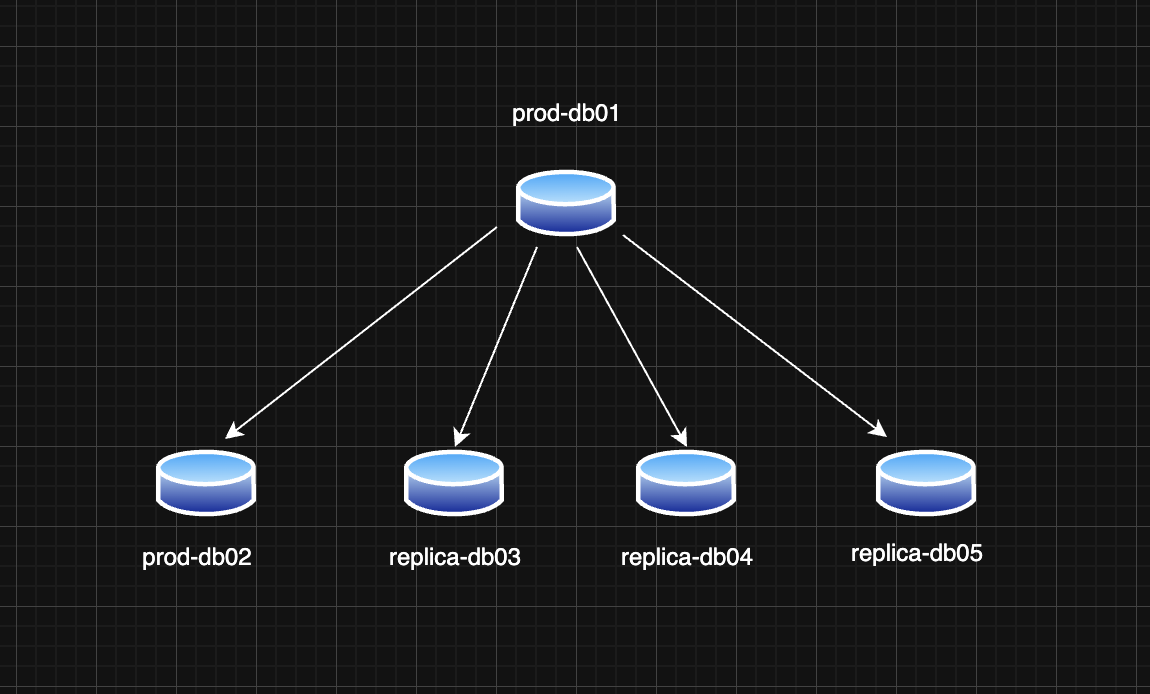
<p>In this post, I’ll walk you through how I did a MySQL primary promotion using GTIDs. Below is our simple replication topology:</p>

<p><img src="/assests/images/replication_topology.png" alt="MySQL Replication Topology" /></p>

<ul>
  <li>One primary MySQL instance: prod-db01</li>
  <li>Four replicas: prod-db02, replica-db03, replica-db04, replica-db05 (each potentially having errant GTIDs due to historical promotion/demotion cycles or unclean state)</li>
</ul>

<h2 id="what-is-gtid-based-replication">What is GTID-Based Replication?</h2>

<p>GTID (Global Transaction Identifier) ensures each transaction is uniquely identified and executed only once across the replication topology. This helps simplify failover and promotion logic.</p>

<p>Each GTID is a combination of <code class="language-plaintext highlighter-rouge">server_uuid:transaction_id</code>, and MySQL keeps track of <code class="language-plaintext highlighter-rouge">GTID_EXECUTED</code> and <code class="language-plaintext highlighter-rouge">GTID_PURGED</code> sets to manage consistency.</p>

<h2 id="why-errant-gtids-are-a-problem">Why Errant GTIDs are a Problem</h2>

<p>An errant GTID is a GTID that exists on a replica but not on the current primary. If such a GTID exists, that replica cannot connect to the new primary (after promotion) unless it also has that GTID.</p>

<p>When promoting a new primary, all replicas must have only the GTIDs that also exist on the new primary (or a subset of them).</p>

<h2 id="step-by-step-promoting-a-new-primary-with-gtid">Step-by-Step: Promoting a New Primary with GTID</h2>

<p>Assume the following GTID sets:</p>

<div class="language-text highlighter-rouge"><div class="highlight"><pre class="highlight"><code>prod-db01  (old primary): Executed GTID set: abc:1-12345, def:1-123
prod-db02             : Executed GTID set: abc:1-12345, def:1-123
replica-db03          : Executed GTID set: abc:1-12345, def:1-123, ghi:1-50
replica-db04          : Executed GTID set: abc:1-12345, def:1-123, ijk:1-100
replica-db05          : Executed GTID set: abc:1-12345, def:1-123, lmn:1-500
</code></pre></div></div>

<p>We’re choosing <strong>prod-db02</strong> as the new primary. This means we need to:</p>

<ol>
  <li>Inject the missing GTIDs (ghi:1-50, ijk:1-100, lmn:1-500) as empty transactions into prod-db02.</li>
  <li>Point the other replicas to this new primary.</li>
</ol>

<h3 id="step-1-inject-errant-gtids-into-the-new-primary">Step 1: Inject Errant GTIDs into the New Primary</h3>

<p>Create a SQL file <code class="language-plaintext highlighter-rouge">inject_gtids.sql</code>:</p>

<div class="language-sql highlighter-rouge"><div class="highlight"><pre class="highlight"><code><span class="c1">-- inject_ijk.sql</span>
<span class="k">SET</span> <span class="n">GTID_NEXT</span><span class="o">=</span><span class="s1">'ijk:1'</span><span class="p">;</span> <span class="k">BEGIN</span><span class="p">;</span> <span class="k">COMMIT</span><span class="p">;</span>
<span class="k">SET</span> <span class="n">GTID_NEXT</span><span class="o">=</span><span class="s1">'ijk:2'</span><span class="p">;</span> <span class="k">BEGIN</span><span class="p">;</span> <span class="k">COMMIT</span><span class="p">;</span>
<span class="c1">-- ... up to ijk:100</span>
<span class="k">SET</span> <span class="n">GTID_NEXT</span><span class="o">=</span><span class="s1">'AUTOMATIC'</span><span class="p">;</span>
</code></pre></div></div>

<p>You can automate it with a shell script:</p>

<div class="language-bash highlighter-rouge"><div class="highlight"><pre class="highlight"><code><span class="c">#!/bin/bash</span>
<span class="nv">uuid</span><span class="o">=</span><span class="nv">$1</span>
<span class="nv">start</span><span class="o">=</span><span class="nv">$2</span>
<span class="nv">end</span><span class="o">=</span><span class="nv">$3</span>
<span class="k">for </span>i <span class="k">in</span> <span class="si">$(</span><span class="nb">seq</span> <span class="nv">$start</span> <span class="nv">$end</span><span class="si">)</span><span class="p">;</span> <span class="k">do
  </span><span class="nb">echo</span> <span class="s2">"SET GTID_NEXT='</span><span class="nv">$uuid</span><span class="s2">:</span><span class="nv">$i</span><span class="s2">'; BEGIN; COMMIT;"</span>
<span class="k">done
</span><span class="nb">echo</span> <span class="s2">"SET GTID_NEXT='AUTOMATIC';"</span>
</code></pre></div></div>

<p>Usage:</p>

<div class="language-bash highlighter-rouge"><div class="highlight"><pre class="highlight"><code>./generate_gtid_injector.sh ijk 1 100 <span class="o">&gt;</span> inject_ijk.sql
mysql <span class="nt">-uroot</span> <span class="nt">-p</span> &lt; inject_ijk.sql
</code></pre></div></div>

<p>Repeat this for <code class="language-plaintext highlighter-rouge">ghi:1-50</code> and <code class="language-plaintext highlighter-rouge">lmn:1-500</code>.</p>

<h3 id="step-2-configure-replication-on-remaining-replicas">Step 2: Configure Replication on Remaining Replicas</h3>

<p>On <strong>replica-db03</strong>, <strong>replica-db04</strong>, and <strong>replica-db05</strong>:</p>

<div class="language-sql highlighter-rouge"><div class="highlight"><pre class="highlight"><code><span class="n">STOP</span> <span class="n">REPLICA</span><span class="p">;</span>
<span class="k">RESET</span> <span class="n">REPLICA</span> <span class="k">ALL</span><span class="p">;</span>
<span class="n">CHANGE</span> <span class="n">REPLICATION</span> <span class="k">SOURCE</span> <span class="k">TO</span> 
  <span class="n">SOURCE_HOST</span><span class="o">=</span><span class="s1">'prod-db02'</span><span class="p">,</span>
  <span class="n">SOURCE_USER</span><span class="o">=</span><span class="s1">'replica_user'</span><span class="p">,</span>
  <span class="n">SOURCE_PASSWORD</span><span class="o">=</span><span class="s1">'*****'</span><span class="p">,</span>
  <span class="n">SOURCE_AUTO_POSITION</span><span class="o">=</span><span class="mi">1</span><span class="p">;</span>
<span class="k">START</span> <span class="n">REPLICA</span><span class="p">;</span>
</code></pre></div></div>

<blockquote>
  <p>Note: Make sure binary log retention is set appropriately to avoid <code class="language-plaintext highlighter-rouge">1236: missing binary log</code> errors.</p>
</blockquote>

<h3 id="step-3-validate-replication">Step 3: Validate Replication</h3>

<p>Run:</p>

<div class="language-sql highlighter-rouge"><div class="highlight"><pre class="highlight"><code><span class="k">SHOW</span> <span class="n">REPLICA</span> <span class="n">STATUS</span><span class="err">\</span><span class="k">G</span>
</code></pre></div></div>

<p>Ensure:</p>

<ul>
  <li><code class="language-plaintext highlighter-rouge">Replica_IO_Running: Yes</code></li>
  <li><code class="language-plaintext highlighter-rouge">Replica_SQL_Running: Yes</code></li>
  <li><code class="language-plaintext highlighter-rouge">Seconds_Behind_Source: 0</code></li>
</ul>

<h3 id="step-4-gtid-sanity-check">Step 4: GTID Sanity Check</h3>

<p>Make sure all nodes have compatible GTID sets:</p>

<div class="language-sql highlighter-rouge"><div class="highlight"><pre class="highlight"><code><span class="k">SHOW</span> <span class="k">GLOBAL</span> <span class="n">VARIABLES</span> <span class="k">LIKE</span> <span class="s1">'gtid_executed'</span><span class="p">;</span>
</code></pre></div></div>

<p>You can use <code class="language-plaintext highlighter-rouge">gtid_subtract()</code> or <code class="language-plaintext highlighter-rouge">gtid_subset()</code> to compare sets:</p>

<div class="language-sql highlighter-rouge"><div class="highlight"><pre class="highlight"><code><span class="k">SELECT</span> <span class="n">GTID_SUBTRACT</span><span class="p">(</span><span class="s1">'replica_gtids'</span><span class="p">,</span> <span class="s1">'primary_gtids'</span><span class="p">);</span>
</code></pre></div></div>

<p>Should return an empty set if the replica is in sync.</p>

<h2 id="lessons-learned">Lessons Learned</h2>

<ul>
  <li>Always check for errant GTIDs before promotion</li>
  <li>Keep GTID sets as clean and consistent as possible</li>
  <li>Automate injection of GTIDs for repeatable and safe operations</li>
  <li>Use <code class="language-plaintext highlighter-rouge">RESET REPLICA ALL</code> when reconfiguring replicas after promotion</li>
  <li>GTID simplifies failover, but you still need to be careful</li>
</ul>

<h2 id="final-words">Final Words</h2>

<p>GTID-based replication brings predictability and reliability to MySQL high availability setups. Proper handling of GTID inconsistencies like errant transactions ensures smooth and safe failover without data loss.</p>

<p>This strategy was tested on a live environment with multi-TB datasets and worked reliably across all replicas.</p>

<hr />

<p>Let me know your thoughts, questions in the comments</p>

<p>Happy Replicating!</p>]]></content><author><name></name></author><category term="jekyll" /><category term="github-pages" /><category term="blogging" /><category term="mysql" /><category term="replication" /><category term="GTID" /><category term="databases" /><summary type="html"><![CDATA[Primary promotion before the introduction of GTID used to be a manual and highly error-prone task. GTIDs simplified it by eliminating the need to be aware of the binary log file names and positions to do a promotion or swap.]]></summary></entry></feed>