Mysql Primary Promotion Using GTID
Primary promotion before the introduction of GTID used to be a manual and highly error-prone task. GTIDs simplified it by eliminating the need to be aware of the binary log file names and positions to do a promotion or swap.
In this post, I’ll walk you through how I did a MySQL primary promotion using GTIDs. Below is our simple replication topology:
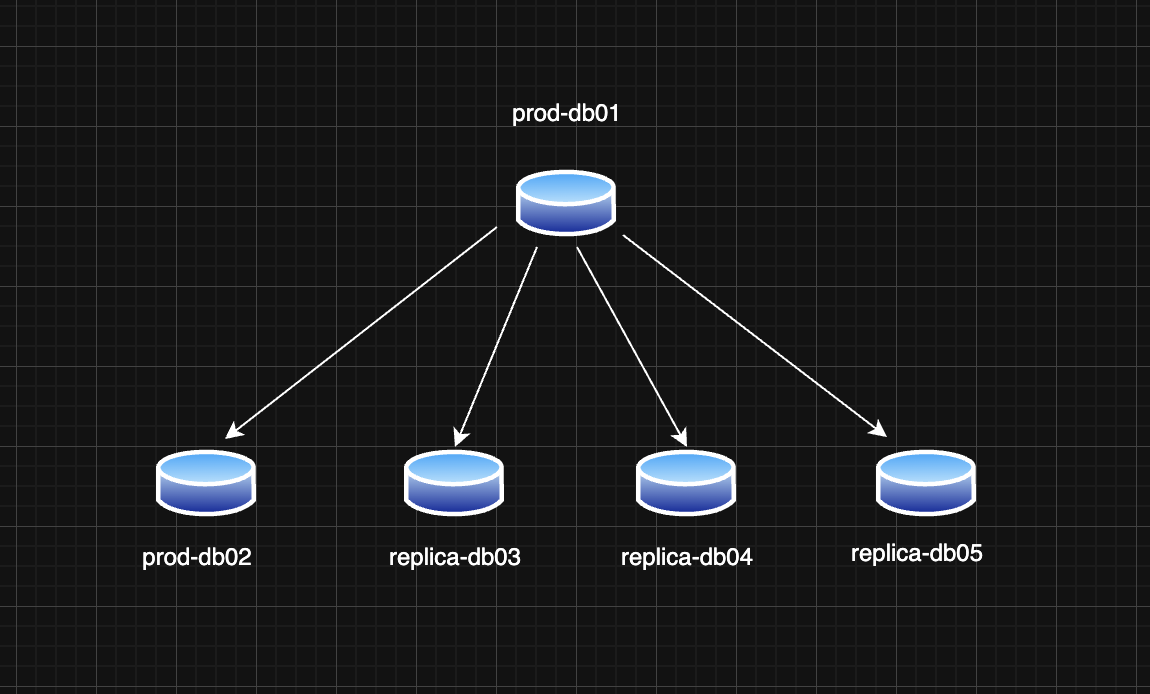
- One primary MySQL instance: prod-db01
- Four replicas: prod-db02, replica-db03, replica-db04, replica-db05 (each potentially having errant GTIDs due to historical promotion/demotion cycles or unclean state)
What is GTID-Based Replication?
GTID (Global Transaction Identifier) ensures each transaction is uniquely identified and executed only once across the replication topology. This helps simplify failover and promotion logic.
Each GTID is a combination of server_uuid:transaction_id, and MySQL keeps track of GTID_EXECUTED and GTID_PURGED sets to manage consistency.
Why Errant GTIDs are a Problem
An errant GTID is a GTID that exists on a replica but not on the current primary. If such a GTID exists, that replica cannot connect to the new primary (after promotion) unless it also has that GTID.
When promoting a new primary, all replicas must have only the GTIDs that also exist on the new primary (or a subset of them).
Step-by-Step: Promoting a New Primary with GTID
Assume the following GTID sets:
prod-db01  (old primary): Executed GTID set: abc:1-12345, def:1-123
prod-db02             : Executed GTID set: abc:1-12345, def:1-123
replica-db03          : Executed GTID set: abc:1-12345, def:1-123, ghi:1-50
replica-db04          : Executed GTID set: abc:1-12345, def:1-123, ijk:1-100
replica-db05          : Executed GTID set: abc:1-12345, def:1-123, lmn:1-500
We’re choosing prod-db02 as the new primary. This means we need to:
- Inject the missing GTIDs (ghi:1-50, ijk:1-100, lmn:1-500) as empty transactions into prod-db02.
- Point the other replicas to this new primary.
Step 1: Inject Errant GTIDs into the New Primary
Create a SQL file inject_gtids.sql:
-- inject_ijk.sql
SET GTID_NEXT='ijk:1'; BEGIN; COMMIT;
SET GTID_NEXT='ijk:2'; BEGIN; COMMIT;
-- ... up to ijk:100
SET GTID_NEXT='AUTOMATIC';
You can automate it with a shell script:
#!/bin/bash
uuid=$1
start=$2
end=$3
for i in $(seq $start $end); do
  echo "SET GTID_NEXT='$uuid:$i'; BEGIN; COMMIT;"
done
echo "SET GTID_NEXT='AUTOMATIC';"
Usage:
./generate_gtid_injector.sh ijk 1 100 > inject_ijk.sql
mysql -uroot -p < inject_ijk.sql
Repeat this for ghi:1-50 and lmn:1-500.
Step 2: Configure Replication on Remaining Replicas
On replica-db03, replica-db04, and replica-db05:
STOP REPLICA;
RESET REPLICA ALL;
CHANGE REPLICATION SOURCE TO
  SOURCE_HOST='prod-db02',
  SOURCE_USER='replica_user',
  SOURCE_PASSWORD='*****',
  SOURCE_AUTO_POSITION=1;
START REPLICA;
Note: Make sure binary log retention is set appropriately to avoid
1236: missing binary logerrors.
Step 3: Validate Replication
Run:
SHOW REPLICA STATUS\G
Ensure:
Replica_IO_Running: YesReplica_SQL_Running: YesSeconds_Behind_Source: 0
Step 4: GTID Sanity Check
Make sure all nodes have compatible GTID sets:
SHOW GLOBAL VARIABLES LIKE 'gtid_executed';
You can use gtid_subtract() or gtid_subset() to compare sets:
SELECT GTID_SUBTRACT('replica_gtids', 'primary_gtids');
Should return an empty set if the replica is in sync.
Lessons Learned
- Always check for errant GTIDs before promotion
- Keep GTID sets as clean and consistent as possible
- Automate injection of GTIDs for repeatable and safe operations
- Use
RESET REPLICA ALLwhen reconfiguring replicas after promotion - GTID simplifies failover, but you still need to be careful
Final Words
GTID-based replication brings predictability and reliability to MySQL high availability setups. Proper handling of GTID inconsistencies like errant transactions ensures smooth and safe failover without data loss.
This strategy was tested on a live environment with multi-TB datasets and worked reliably across all replicas.
Let me know your thoughts, questions in the comments
Happy Replicating!